The Explorer: click any gauge on Earth, nothing to install
Live: rekin226-aquascope-explorer.static.hf.space (a copy also runs under /explorer/app/ on this docs site).
A static page, no server. It reads the station catalog from the Archive with DuckDB-WASM, shows every station on a MapLibre map, and when you click one it fetches the observed record from the agency and runs aquascope in your browser (Pyodide) to compute:
- the hydrograph and annual maxima,
- flood frequency: GEV by L-moments and Log-Pearson III with analytical 90 % confidence limits, plus an optional bootstrap GEV band (1,000 refits, on demand),
- the flow-duration curve with Q95 / Q10,
- a Mann-Kendall trend with Sen's slope on the annual means,
- and a "Methods and citations" panel naming exactly what was computed and the references, so the numbers are defensible in a report.
The full record is fetched by default; the Period control on the record card
cuts it to the last 40 or 20 years. Every result has a permalink
(#s=<source>/<station_id>, plus &yr=40 or &yr=20 for a shorter period), a
CSV download, an Export for… menu that writes the record as inputs for HEC-HMS, HEC-RAS,
HEC-SSP, SWMM, MODFLOW 6, Delft-FEWS or Raven (engineering exports),
and a link to the agency page. Data licence and attribution are shown per source.
Click anywhere that is not a gauge and you get the hydrology of that point
(#p=<lat>,<lon>): ERA5 rainfall and temperature, FAO-56 reference
evapotranspiration and the aridity class, a monthly climate chart, GloFAS
modelled discharge with an indicative return-period table (clearly labelled
as a model, not a gauge), and the nearest gauges to click next. All from
Open-Meteo, keyless.
The search box finds rivers, lakes and places by name as well as gauges (Photon
by komoot, OpenStreetMap data, ODbL). A river named as typed comes first, the
whole river before one of its stretches, and picking it opens the point on the
River tab: "Jamuna" lands on the Jamuna River in Bangladesh. A point that
came without a name (a click, a #p= link) is titled with the nearest named
water within 5 km, else the nearest town, and the line under the title says the
name comes from OpenStreetMap.
Stations already mirrored in the Archive load from it (one small file) instead of from the agency, so they are faster and do not add load upstream.
My data: your own record, the same analyses
My data (top left) is the other half of the app. Drop a CSV or an Excel
export, paste a table, or send the gauge you are looking at. aquascope.ingest
works out which column is the date and which is the value, converts to SI and
shows a QA report (gaps, duplicates, flat runs, outliers, units) before anything
is computed. Then the workbench
analyses appear by tab:
| tab | analyses |
|---|---|
| Quality | exploratory summary, quality report, preprocessing, insights, the WHO drinking-water screen |
| Hydrology | flow-duration curve, baseflow separation (Lyne-Hollick, Eckhardt, UKIH), recession, flow signatures, FAO-56 ET0 and irrigation scheduling |
| Extremes | GEV flood frequency, return periods (GEV / LP3 / Gumbel with confidence limits and the empirical points) |
| Groundwater | standardised groundwater index with drought events, water-table-fluctuation recharge, Theis drawdown |
Each has its own parameters, a chart, a JSON download, and its methods and citations, accumulated for whatever you actually ran. Nothing is uploaded: the file is read in your tab and the analysis runs there.
These are the same functions the Streamlit dashboard used to own, so
aquascope dashboard, the MCP server, aquascope ask and this page all run one
implementation rather than four that drift. The public Streamlit deployments
have been retired in favour of this.
The shell
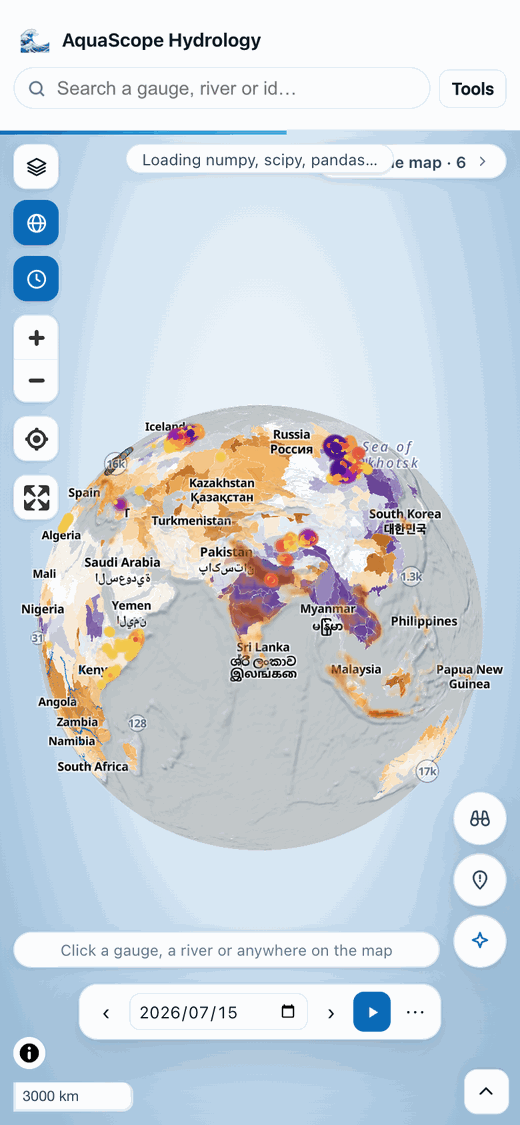
The map is the page. It fills the window, and the layer rail, the inspector and the Analyst float over it as cards, so the map is the first thing you see and opening a panel never takes width from it. The rail (the stacked-squares button at the top left) is closed on arrival and groups its controls under Sources, Basemap, Relief, Overlays and Credits; the chevron at the top right folds the inspector away or brings it back. The inspector starts folded: a click answers in the map card below, and its Details button opens the inspector on the right tab. On a phone the map keeps the screen and the inspector is a bottom sheet.
The world view is a globe, because the coverage is worldwide and thin, and
Mercator spends its pixels on the empty high latitudes. MapLibre eases the globe
back to Mercator by about zoom 5, so everything below the world view behaves
like an ordinary map. The button under the layers button switches projection,
and gl=0 in a link pins a flat map.
The map card
A click answers on the map. Click a gauge, a river or any place and a small card opens beside it, pointing at what you clicked:
- what it is: the gauge's name and agency, or the river reach the click snapped to (or "Place" when no mapped river is near),
- today against normal in one sentence, with the class colour the gauges use (brown is below normal, slate is normal, teal is above). For a gauge it comes from the Archive's daily status snapshot when the gauge is in it, else it is ranked from the record once that has loaded; for a river it comes from the reach's simulated record since 1940, and says simulated,
- one sparkline: the record's last 12 months (from zero), or for a river the next 15 days from GEOGLOWS (the line is the ensemble mean, the shading its middle half, drawn on its own range so a rise shows; the number beside it gives the size),
- one number: the newest value and its day, or the forecast's peak and its day,
- Details (the full panel, on the right tab), Trace to sea (draws the path on the map), ☆ Watch and Study.
A click that misses the river (no stream within 1 km, easy from far out) says how far the nearest and the larger river are, and Use the larger river (or Use the nearest river) takes it in one click.
The card shows at once with what is known (the name and position) and fills as the
answers arrive. Its last line says where the numbers come from. Escape or ×
closes it; folding the panel away brings it back. On a phone it is a short sheet at
the bottom of the map. A link with tab= (#s=usgs/USGS-01013500&tab=floods)
opens the panel on that tab as before; a link without one opens the card.
Other layers can open a card with their own content (a flood cell, a warning reach)
through openCard() in explorer/src/map-card.js (also actions.openMapCard):
pass id, lngLat, what, title, and any of sub, status, spark, figure,
plume (an ensemble forecast, in place of the sparkline and the number; see
the FEWS view), credit, details
and buttons; it returns a handle with update(patch) and close().
Ask the map
Tell the map what to show, in plain words. Press / or the Ask the map pill at the top of the map and type, for example:
- "trace the Nile to the sea", "what drains to the Danube", "show the Rhine"
- "go to Bangladesh", "show the whole world", "zoom in"
- "September 2023", "last July", "play the last 5 years", "stop"
- "turn on floods past", "hide the flood forecast", "satellite view", "flat map"
- "where are rivers much above normal in South Asia last July"
- "draw an area around Bangladesh", "drop a pin here saying Dhaka: check the gauges"
- "undo", "undo all"
The map does it at once, and every change is listed under the box in the action log, newest first, with an undo for each and Undo all. Undoing an older action leaves the screen alone if a later one has changed the same thing since, and a later undo of that one goes all the way back. With the box closed, the log folds into a count beside the pill.
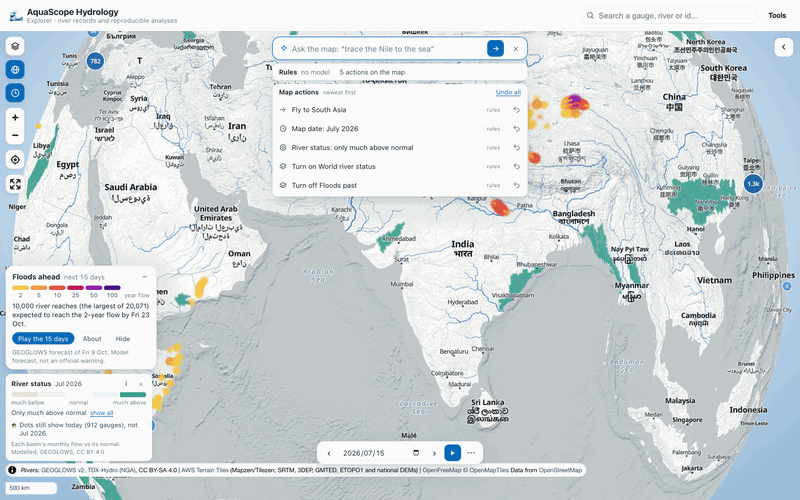
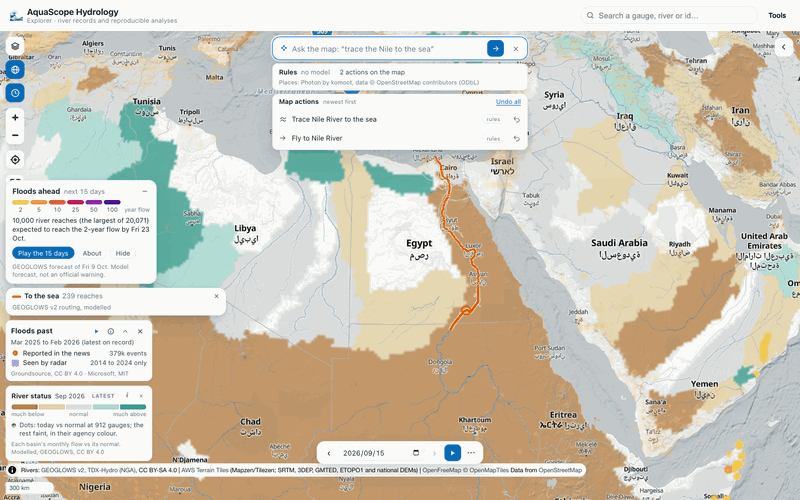
Who reads the words, in order, and the line under the box says which one did:
- The rules, always, with no model and no key: a phrase grammar in the package
(
aquascope.map_commands.parse_command) that understands the common requests above. It answers only when it understood every word, and passes the rest on. - The model on your device, where the browser already has one ready: Chrome's built-in model, or a WebLLM model Ask has loaded in this tab. It never starts a download by itself.
- Your own model, with the key you gave Ask ✨ (any provider in its list). The maintainer's keys and credits are never used for visitors.
Whatever answers, the actions are checked by the package before they run (a model's reply that names an unknown layer or a future date is refused, and the line says so), and place names are looked up in the same gazetteer as the search (Photon by komoot, OpenStreetMap data, ODbL); a name it does not hold is tried as a gauge in the catalogue. A river is lit from the point the gazetteer gives for it ("the Nile" starts at Lake Nasser), so "what drains to the Nile at Khartoum" or a click picks a better start. "Where are rivers much above normal" turns the world river status on and paints only those basins; the River status row in On the map opens to say what is left out, with show all.
The actions (fly_to, set_time, set_layer, focus_status, set_basemap,
highlight_river, draw_area, add_pin) are the same everywhere:
aquascope map "trace the Nile to the sea" [--resolve] [--llm] prints them, the
MCP tool map_command returns them with their JSON Schema, and an assistant in the
browser can run them through the WebMCP tool aquascope_map_actions, into the same
log. Pins are an API for the page's own roles: addPin({lat, lon, title, text,
facts, source}) in explorer/src/map-actions.js (also actions.addPin) drops a
pin that opens a map card with its note, facts and source, listed in the log like
any action; pins() lists them.
Scout
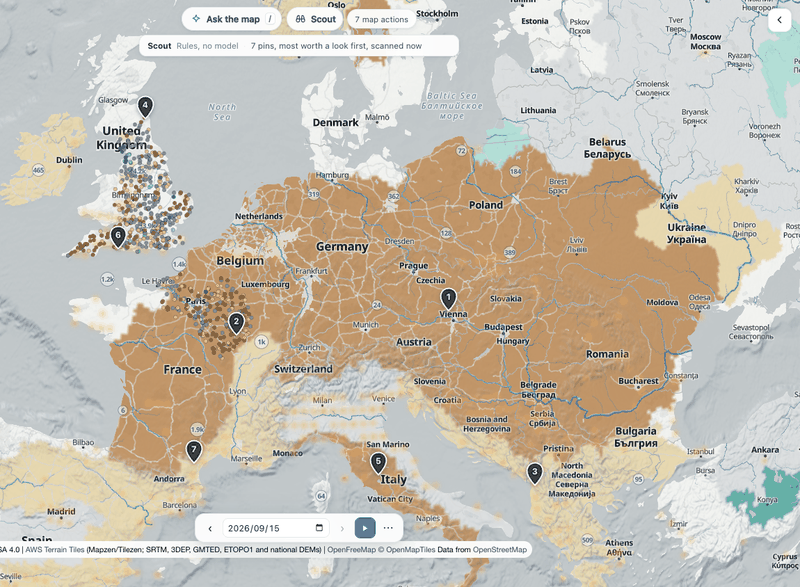
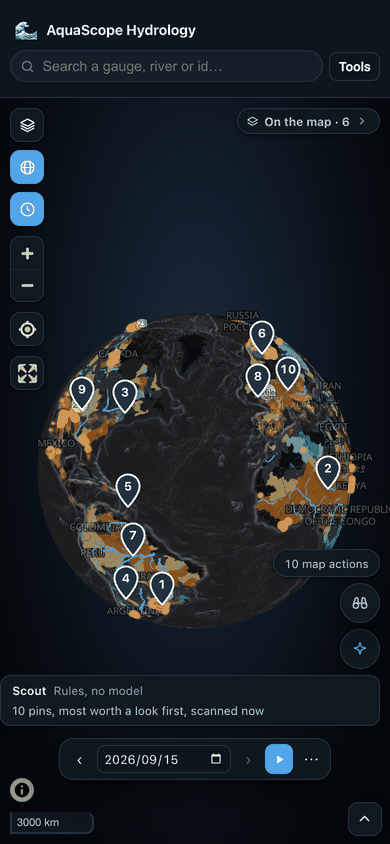
The Scout pill beside Ask the map looks at the view on screen and drops up to ten numbered pins on what stands out, most worth a look first. Each pin opens a card with its title, its reason in a sentence or two, the main number and where it came from. The pins go in the action log, so Undo all or a pin's Remove pin takes them away, and a second Scout replaces the first one's pins. Scout and Explain this view take turns: each clears the other's numbered marks, so one set of numbers is on the map at a time. A pin's row in the log opens its card.
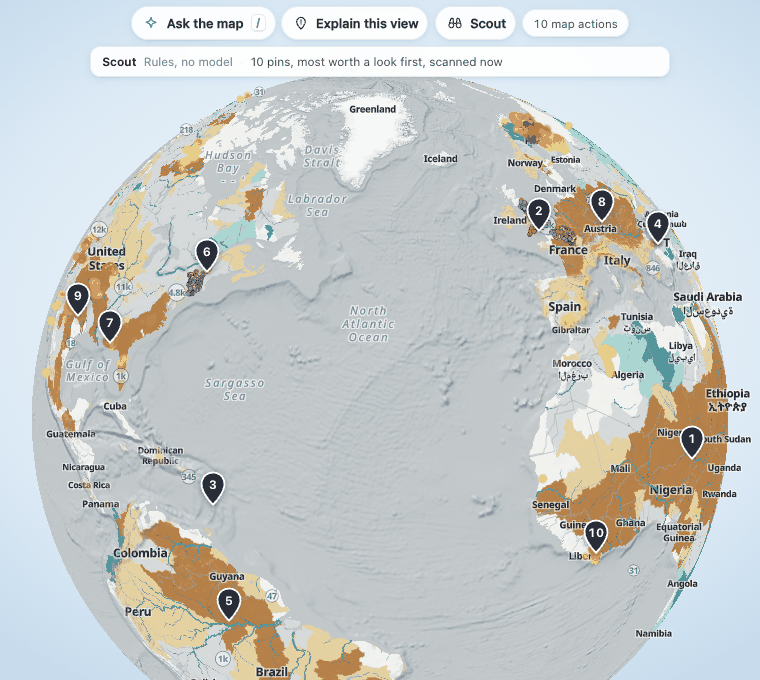
What it looks for, by fixed rules in aquascope.map_scout:
| Kind | What makes it stand out | Data |
|---|---|---|
| World river status | The largest connected areas much above or much below normal in the month's map | GEOGLOWS v2 HydroSOS (modelled), CC BY 4.0 |
| Floods ahead | The reaches with the highest return-period class and the largest rivers, one pin per river group | GEOGLOWS v2 forecast, CC BY 4.0; return periods CC BY-NC-SA 4.0 |
| Floods past | The month's strongest groups of flood events in the news and radar detections | Groundsource (CC BY 4.0), Microsoft Sentinel-1 (MIT) |
| Gauges today | Groups of gauges much above or much below normal for the date, around the most extreme one | The Archive's daily snapshot |
| Models and gauges | Gauges where even the best model scored does no better than the gauge's own mean flow | The evidence table (skill/model_skill.parquet) |
The month is the map's: move the time bar to a month and Scout looks at that month's river status and floods in the news. Floods ahead and the gauges are always today's. Two pins never sit closer than about a pin's height on screen, a pin that would stand under the bars, the time bar or the legends is left out for the next finding, and each kind has a share of the ten (the past and the evidence table fewer), so one busy place does not take every pin. A pin's place name comes from the same gazetteer as the search (Photon reverse geocoding, OpenStreetMap data, ODbL). Photon answers one request at a time, so the pins drop at once under a named region or their coordinates and take their place names over the next few seconds; when Photon does not answer, they keep those.
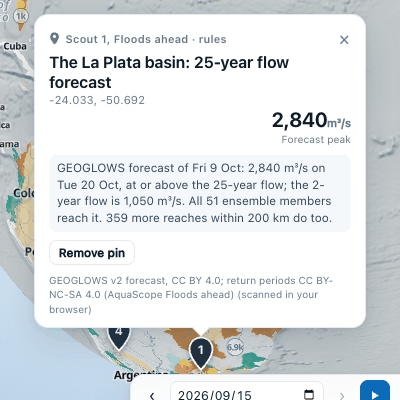
Where the findings come from. Each day, after the Floods ahead issue, the
flood-warnings workflow runs the scout over the whole world and publishes
scout/latest.json (and a dated copy) in the Archive dataset, writing nothing else.
That file adds record checks a browser cannot afford: the share of a named region
much above or below normal against the same calendar month of every year since 1990
(about 36 status maps), and a group of flood cells against the same month since 2000
(news coverage grows over the years, which the method notes). When the view is half
the globe at the newest month, Scout uses that file, and the line under the bar says
"from today's scout file". Anywhere else, or before the first file is published, it
scans the view in your browser, in a few seconds once the engine has started.
With a model. Keyless, the rules' own sentences are used. With Chrome's built-in
model ready, or a key in Ask ✨, the model puts the findings in order and words them,
choosing from a few more than ten. It never writes a number: every number, date,
place and ranking is a slot ({area}, {peak}, {month}) that the package fills in,
and wording with a digit, a percent sign, a number word or a word like "record" or
"largest" outside the slots is refused, and so is a sign set against a slot ("-{peak}",
"minus {area}"), so the rules' wording stays. A wording must also keep what its finding says (CLAIMS): "much
below normal" stays below, and "the models miss this river" is not turned into "questions about the gauge's
measurement". The line says who worded the pins (the rules, when no wording of the model's was used) and gives the
first refusal's reason. A slot's exact value written
out ("September 2026" for {month}) counts as that slot, so a correct wording is not refused for it. The findings
the model leaves out, or whose ids it mangles, follow in the rules' order, so none is dropped. The maintainer's keys are never used for visitors.
The same scan is aquascope layers scout [--bbox W S E N] [--month YYYY-MM]
[--published], the MCP tool map_scout, and, for an assistant in the browser, the
WebMCP tool aquascope_scout. It is model output and news reports, not a warning.
Explain this view
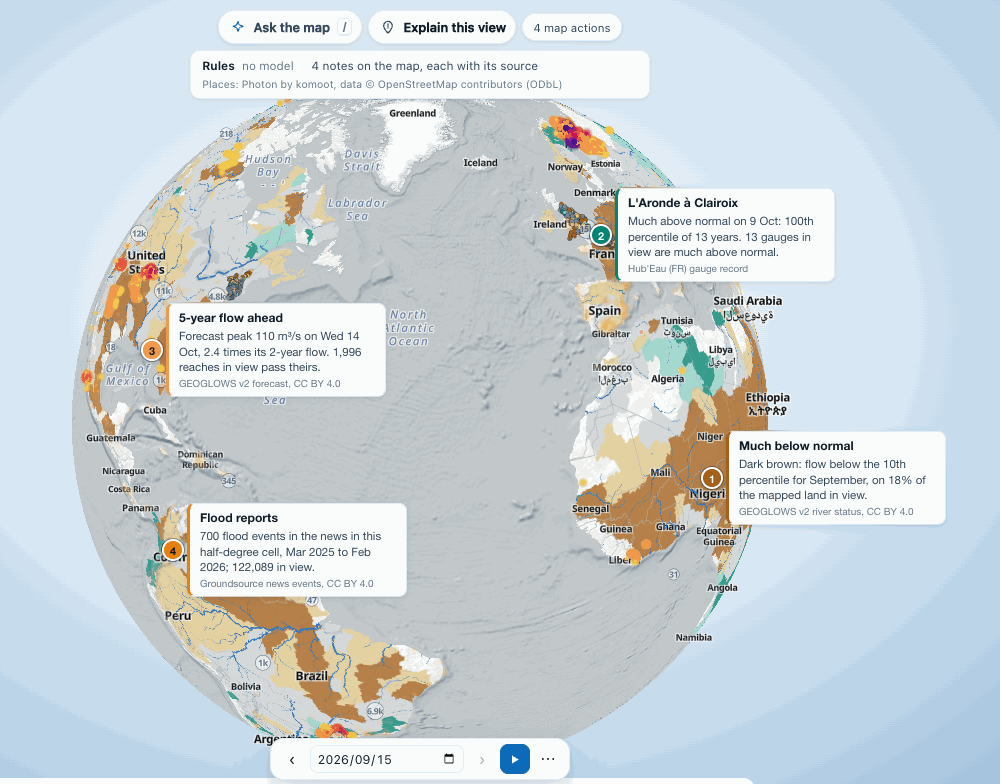
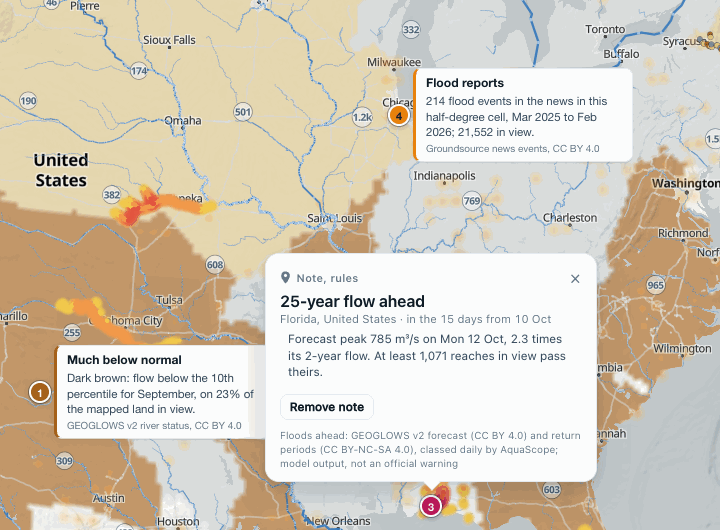
"What am I seeing?" gets an answer on the map, not in a report. Press Explain this view beside the Ask the map pill, or type "what am I seeing?" in the box, and three to five short notes are pinned where they belong: a numbered dot in the colour of what it describes, with a card beside it that names its source.
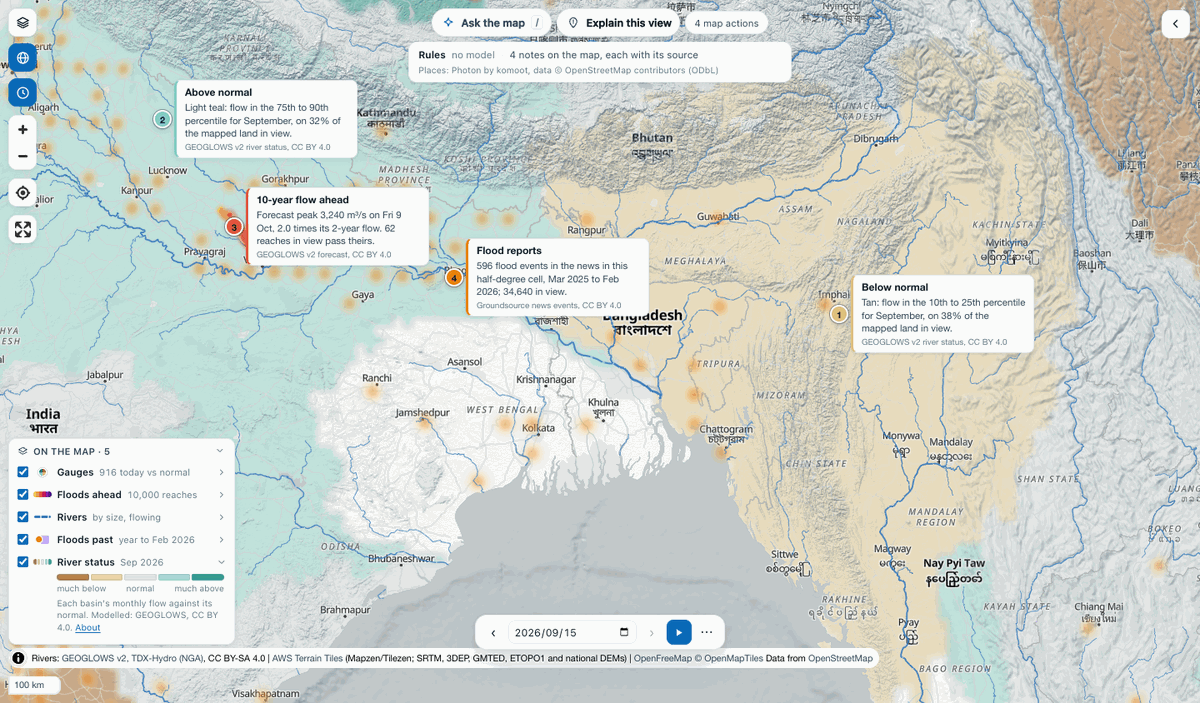
The notes come from facts the package reads off the layers that are on, inside the
part of the map you can see (aquascope.map_explain.view_facts):
- World river status: the share of the mapped land in view below and above normal, and the largest area in each class but normal, with what its colour means ("Dark brown: flow below the 10th percentile for September, on 22% of the mapped land in view"). It reads the month's file, the one the map shows.
- Floods ahead: how many reaches pass their 2-year flow, and the one forecast to pass the highest return-period flow, with its peak and its day. On a date inside the forecast's 15 days, the class is that day's, as on the map.
- Gauges (coloured by today against normal): the ones furthest above and below normal for the date, with the years of record behind them. The side with more gauges far from normal comes first, and the other side's gauge keeps clear of it.
- Floods past: the half-degree cells with the most flood events in the news and the most radar detections over the months on show, and the totals in view.
Each fact has its value, unit, place, date and source. The pins stay off the legend, the box and the time bar, keep apart from each other, and on the globe keep off its rim; a large area offers a few spots inside it, so its note can move aside for a reach or a gauge. The cards take whichever side keeps them clear of each other.
Who words the notes:
- No model, no key: fixed wording from the same facts (
template_notes). This always works. - The model on your device or your own key from Ask ✨, in the same order as
Ask the map. The model only chooses and orders the facts and writes the words
between them. It writes each number as a placeholder (
{f3}), which code fills in from the facts, and a note whose words hold any other number, in digits or in words ("twelve", "half"), or with a sign or a digit set against a placeholder ("-{f3}", "minus {f3}", "{f3}0", which would change the number code puts in), is refused (the claim lock, the same check Scout and the mesh review make); the line under the box says how many were refused and why. A note whose numbers are all in its facts can still claim more than they say: "96% of the land is significantly below normal" when the 96% is of land below or much below normal is refused, and so is a side of normal its facts are not on. A share of the mapped land is written as a share ("{f4} of the mapped land"): written bare, as in "the river is mapped at 21% above normal" or "flow at least 81% below normal", it reads as a change in flow that no fact holds, and the note is refused. A value the model writes again after its placeholder ("54% (54%)", "km² km²", "on on Sat 7 Nov") is written once, and a sentence that only copies the prompt is dropped. When fewer than three pass, notes in fixed wording on the other facts make up the rest. When none passes, the line says the model's wording was refused, with the reasons, not that no model was asked.
A layer still reading its file (just after the page opens, or after a new date) is waited for before the view is read. A click on a note opens it in the map card, with every fact it cites and the full credit. Each note is in the action log (marked with who wrote it) with its own undo, and Undo all clears them; explaining again replaces the notes of the time before. Place names come from the search's gazetteer (Photon by komoot, OpenStreetMap data, ODbL), only for the places the notes use; when it cannot be reached the notes stand without names.
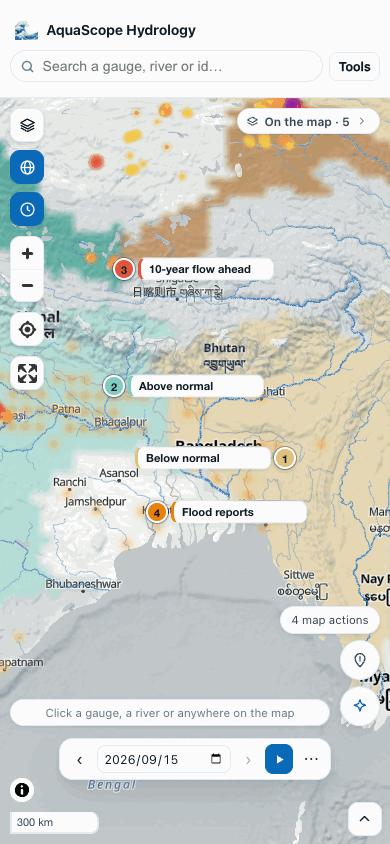
On a phone the cards show their titles only, and a tap opens the whole note.
The same engine answers outside the page: aquascope layers explain W S E N [--date]
[--layers ...] [--facts] [--llm] prints the notes (and with --facts, every fact),
and the MCP tool explain_view(bbox, date, layers) returns the facts and the notes as
JSON. Both read the published layers themselves.
What if, on the map
"What if it rains 20% less?" changes the rivers on the map, not a table. On a river reach's map card (or a gauge's, once its river is found), What if… opens a small panel: a rain slider, a warming slider and a demand (m³/s taken from the river), and one line for words.
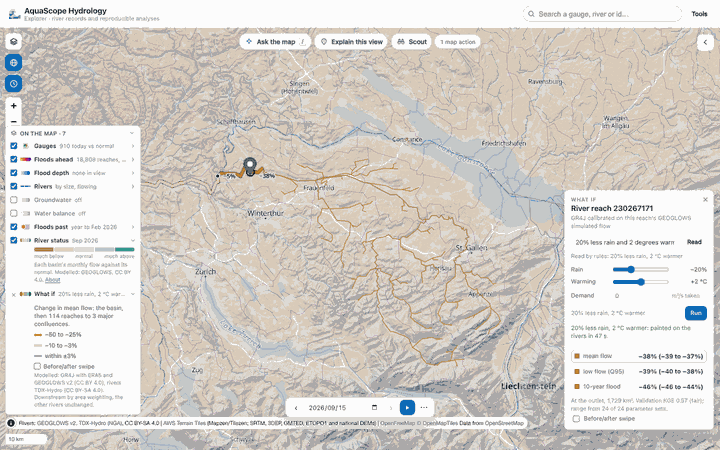
Run calibrates GR4J for the basin that drains to the reach and runs it without and
with the scenario (aquascope.whatif_map.whatif, in the worker):
- The basin comes from the GEOGLOWS v2 routing tables, the ones the upstream area and the trace to the sea read. The forcing is ERA5 (Open-Meteo) at the basin's area-weighted centre; a basin over 100,000 km² is refused, since one cell cannot stand for its weather. The panel says so as it opens (the Rhine at Cologne, 143,881 km²), before any words are read, and Run stays off.
- The model is GR4J, with a degree-day snow store where enough of the rain falls
below freezing (
aquascope.advanced.catchment_model). On a gauge it is calibrated on the gauge's record; on a reach without one, on the reach's GEOGLOWS simulated flow, and the panel says so. Half the years calibrate, the other half validate. - The answer at the outlet: the change in mean flow, low flow (Q95, the flow exceeded 95% of days) and the 10-year flood (GEV on the simulated annual maxima), each with a range: 24 parameter sets near the calibrated one, kept when they do as well on the validation years (KGE within 0.05), each run with and without the scenario.
- Downstream, the change is carried by area weighting to the third major confluence (a tributary at least a quarter of the main stem's area): at each reach, the outlet's change times the share of the drainage area the basin makes up. This assumes the rest of the drainage area unchanged and running off at the same rate per km². It ignores wetter or drier tributaries, dams and lakes, and floods that do not peak together; the flood is the roughest of the three.
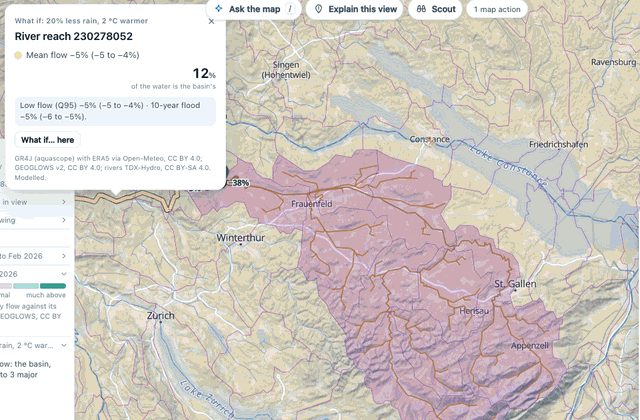
The map shows the answer directly. The basin's reaches take the outlet's change (the model is lumped: one change for the whole basin). The river below them fades as other rivers join, coloured from brown (drier) to teal (wetter), quiet grey within ±3%. A label gives the change at the outlet and after each major confluence. The panel lists the three changes and switches the colours between them.
Before/after swipe (in the panel or the legend row) draws a divider across the map: left of it the rivers as they are modelled today, in their own blue; right of it, the scenario.
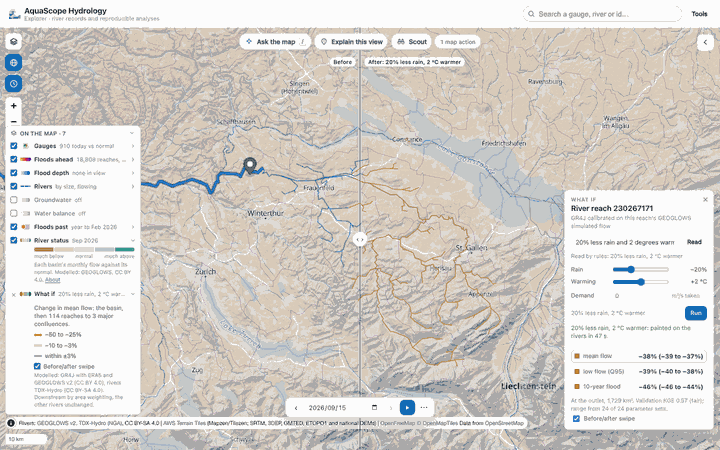
A click on a painted reach opens its map card: the three changes with their ranges, the share of the water that comes from the basin modelled, and the confluence when there is one, with What if… here for that reach's own basin.
Who reads the line, in the same order as Ask the map:
- No model, no key: fixed rules (
parse_scenario) read "20% less rain and 2 degrees warmer", "a fifth less rain", "take 5 m3/s for irrigation", "rain -10%, +1.5 °C", "300 litres per second" (or l/s), "three degrees warmer". This always works. An evaporation change has no slider but goes with the run, and the line says it. When the rules read only part of the line, it goes to a model whole; with none to ask, the line says what the rules read and which words they could not, puts the part read on the sliders, and does not run. - The model on your device, then your own key from Ask ✨. The model only fills the four parameters (rain %, warming, evaporation %, demand). A number it gives that is not in your words, one your words say once but it uses twice, one going the other way from your words ("20% more rain" is never -20), or one outside the limits is refused (the claim lock), and the line under the box says who read it. The values go into the sliders before the run, so you see exactly what runs. When a model's reading is refused, the line says which model and why, and suggests only a way not yet tried. The model changes the whole year, so a line that names a part of it ("summers get much hotter, maybe three degrees") runs as a year-round change and the line says the season was not applied. A small value keeps its figures: 20 litres a second reads "0.02 m³/s taken", never "0 m³/s".
Every run is in the action log with its undo; a new run replaces the painting and undo puts the one before back. A second scenario on the same basin reuses the calibration (the fit is seeded, so the numbers are a fresh run's), which makes it quick. The first run takes about a minute in the browser: measured 47 to 90 s in headless Chrome for the Thur (1,729 km²), engine start included; 10 s from the command line.
On a phone the panel is a sheet, and after a run the sliders fold away so the map shows the answer; Change the scenario brings them back.
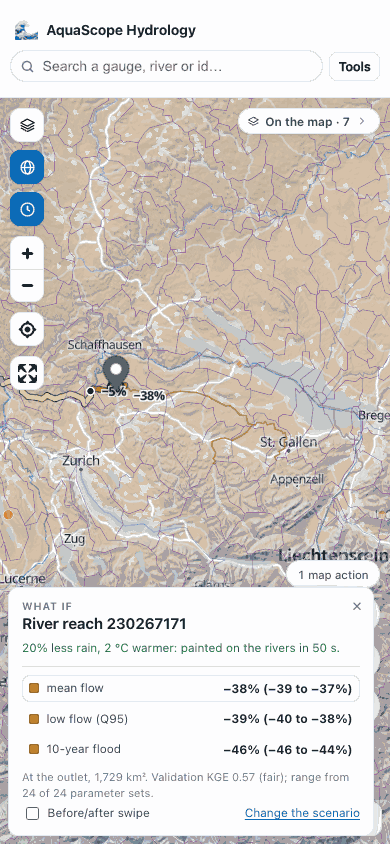
The same engine answers outside the page: aquascope whatif --lat 47.598 --lon 8.682
"20% less rain and 2 degrees warmer" (or --river ID, --source and --station for
a gauge, --rain, --warming, --demand, --rp, --llm with your own key,
--json) prints the outlet's numbers and the reaches downstream, and the MCP tool
whatif_map returns them as JSON. The numbers on the map are the CLI's: the same
seeded calibration gives −38.3% mean flow, −38.5% low flow and −46.0% 10-year flood
for the Thur in both.
Map layers
The rail is a layer stack, and every layer in it is keyless and free to use. Nothing here needs an account, and each carries its attribution and licence in the rail, in the map credits and in an info panel.
Basemaps: OpenFreeMap light, dark and streets (OpenStreetMap data, ODbL); Sentinel-2 cloudless 2016 and 2025 from EOX; EOX Terrain Light; NASA GIBS VIIRS true colour for a chosen day; USGS imagery over the United States.
Relief: 3D terrain and hillshade from the AWS Terrain Tiles DEM. Hillshade is on by default; the light basemap on its own is near-white land on pale water, which reads as an empty page rather than as a map.
Overlays, each with an opacity slider and its own colour scale: GPM IMERG precipitation rate, SMAP root-zone soil moisture, MODIS snow cover, MODIS land surface temperature, GRACE water storage anomaly, ESA WorldCover land cover, and JRC Global Surface Water (how often each 30 m pixel was water from 1984 to 2024). The time-driven ones follow one date, set in the time bar (below).
On the map: one legend, one line
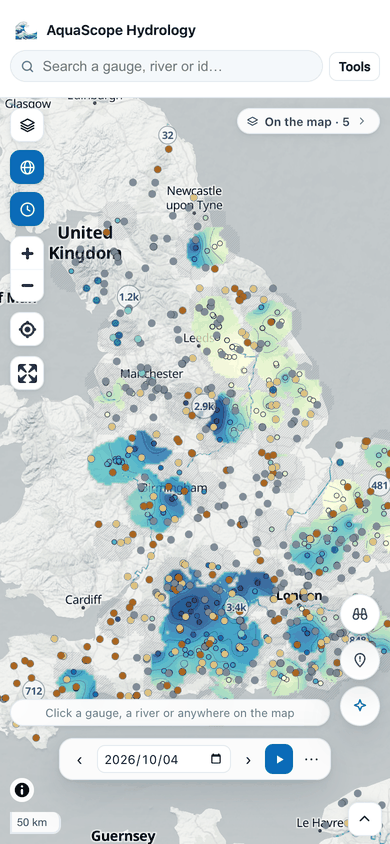
Every layer on the globe has one row in a single legend, On the map, bottom left (top right on a phone), in the order the layers are drawn: gauges, Floods ahead, rivers, Floods past, then the river status underneath. A row is a visibility toggle, the layer's mark, its name and a few words (the month, a count); click the name to open its key, with the colours, the counts, About and, for the dated layers, a replay. A layer with nothing to draw (Floods ahead before its first daily issue, say) is one muted line, and a layer turned off stays listed so it can come back. While a river is lit, a This river row on top says what the blue and the orange mean, and its × clears it. On a wide screen the river status's row starts open; on a phone the whole legend starts as one small chip, and opened it stays inside a quarter of the screen.
When the scheduled job behind a layer is late (its last success is older than
its cadence allows, from the Archive's health/jobs/index.json), the row says
how old the data is, 3 d old, and its tooltip names the job and how often it
runs. Tools > Data status lists every job: on time, late, last run failed,
or run when dispatched (Job health).
Above the globe, one line says what the map shows this month, made from the
river status file itself: for a few regions a reader knows by name (rough boxes
such as the Amazon, the Sahel or South Asia, not basins), the share of the mapped
area below and above normal, weighted by latitude, and the regions where at
least half is one or the other: River status, September 2026: much of the
Sahel and the Amazon below normal, much of southern Africa above. It follows
the time bar, so a replay narrates itself, and it shows on the world view only:
zoomed in on a region, a world headline would only talk over the map. It sits
under the Ask the map pill, and steps aside while the box is open. The same line and the shares are
aquascope layers status [YYYY-MM] --summary and the MCP tool
river_status_summary (aquascope.map_layers.river_status_summary); the page
makes them from the file its worker has already decoded, and a test keeps the
two equal.
The gauges stay quiet on the globe: the clusters are small, light and see-through with a small count, so the river status and the rivers read first, and the gauges with a status today (912 when this was written) show as small dots in their today-vs-normal colour while the rest are still clustered. A click on a cluster zooms in; from zoom 7 every gauge has its own mark.
World river status
The map opens on the state of the world's rivers. Every river basin is coloured by
how its flow that month compares with the same month in other years, from much
below normal (brown) through normal (a light wash) to much above normal (teal), at
the newest month GEOGLOWS has published. Its row in On the map names the month
and opens on the five classes; About says how the map is made and the toggle
hides it (the rail's Overlays has it too, with an opacity slider). ws=0 in a link opens
without it.
The time bar drives it. With no date in the link the map opens in the middle of the newest month with a monthly step, so Play walks the months, and ‹ › step one at a time back to January 1990. The next month is read while the current one shows, so frames do not flash. A month with no map (before 1990, after the newest, and March 2026, which is missing from the series) draws nothing and the card says so. While it replays the past, the card says the gauges still show today.
It is GEOGLOWS v2's monthly HydroSOS map: one GeoTIFF a month in GEOGLOWS's public
bucket (hydrosos/cogs/YYYY-MM.tif, 7200 x 3600 cells of 0.05 degree, about
500 kB, CC BY 4.0). Each HydroBASINS level-4 basin takes the class of its outlets'
modelled monthly mean flow in the GEOGLOWS retrospective simulation against the
10th, 25th, 75th and 90th percentiles of that calendar month
(hydrosos/thresholds.parquet), as GEOGLOWS's monthly_products.py writes it.
Modelled, not measured, and one colour per basin, so a small river inside a large
basin can differ. The page reads the file in a worker with geotiff.js, turns its
colours back into the five classes and lays them on a Web Mercator image, which
MapLibre draws on the globe and on the flat map alike. It sits under the
basemap's water and labels and under the gauges, and fades as you zoom in.
The colours are the gauges' own: the same five as Today vs normal, which is how the gauges are coloured by default. A gauge the daily snapshot covers takes its class colour; every other gauge keeps its agency colour, and the legend says which. While the time bar replays a past month, the Gauges row says the dots still show today. GEOGLOWS draws the classes in the WMO HydroSOS red-to-blue; the info panel says so.
aquascope layers status [YYYY-MM] and the MCP tool river_status_month give the
month's file, its legend with the file's colours, the months that exist (the
bucket is listed live) and the licence.
Time on the map
The time bar sits at the bottom of the map whenever a dated layer is on (the clock button under the projection button opens it at any time). Every dated layer follows its one date: VIIRS true colour, IMERG rain, SMAP soil moisture, MODIS snow and land temperature, GRACE water storage.
- ‹ › step back and forward, by a day, a week or a month.
- Play walks a range and loops. Without a range it plays the twelve steps up to the date.
- Click a day on a chart (a hydrograph, a GR4J run, a comparison) and the map jumps to that day, with a short "Map set to" note. If no dated layer is on, rain comes on so the jump shows. Annual-maximum markers do not move the map, because they are drawn at 1 July rather than on the day of the peak.
- Behind ⋯: the step, the range, Compare and Make a GIF. Compare lays a second map over the first, cut by a handle you drag: the right side shows another date, or one other dated layer. The gauges stay on the left, where they can still be clicked. Make a GIF plays the range (up to 40 frames, 640 px wide), waits for each day's tiles, stamps the date and the NASA credit on every frame and downloads the file. It is all made in the browser, with gifenc (MIT).
Each layer knows its first and last day (GRACE in GIBS stops in July 2022, SMAP
starts in March 2015), and the bar says so when the date is outside one. GRACE
also knows its missing months (the GRACE to GRACE-FO gap) and its images that
start mid-month, so each month asks for the image GIBS really has.
aquascope layers list --live shows the exact intervals and gaps from GIBS, and
aquascope layers frames LAYER --start --end --step the dates and tile URLs of
a time-lapse (the MCP tools dated_layers and layer_frames are the same
functions).
The date, the step, the range and the compare date go in the link
(d=2024-05-01&ts=week&r=2024-01-01..2024-06-30&cmp=2023-05-01), so a
time-lapse view can be shared. Other features can follow the same date: it is
state.date, changed only through setTime() in core.js, with onTime() to
subscribe.
The gauges themselves carry their agency as a shape as well as a colour: a circle for USGS, a triangle for the Environment Agency, a square for Hub'Eau, a diamond for PEGELONLINE, a pentagon for OPW and a cross for CWA. Colour alone does not survive colour-vision deficiency (Hub'Eau's red and the Environment Agency's green are ΔE 4.2 apart under deuteranopia, and they are the two largest European sources), so identity carries two channels. They can also be coloured by record length or by how recently they last reported, with a legend, and the shape goes on saying the agency underneath; a density heat map shows where the world is actually measured. Select an area drags a box and hands back the gauges inside it as CSV; its Context button lists what the box holds (see below) and puts its flood events on the map.
The whole state (basemap, overlays, opacity, date, terrain, globe, colouring) lives in the URL, so a view is a link.
Floods past
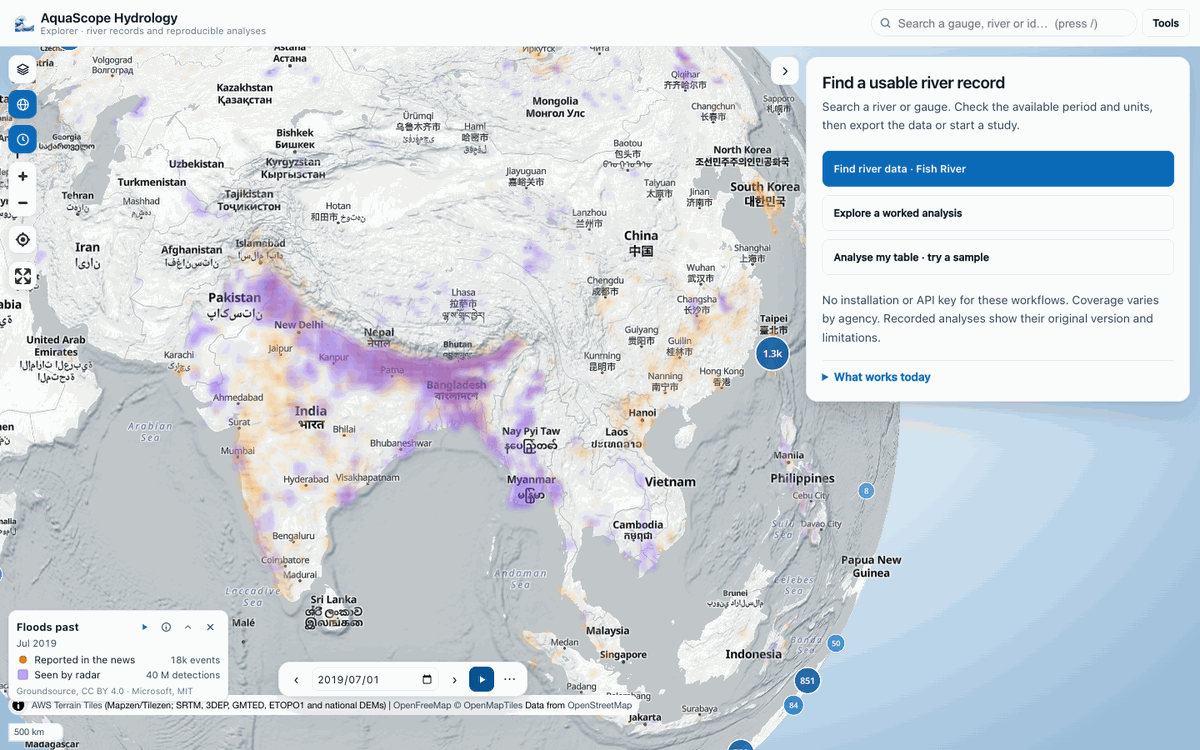
Where floods actually happened, on the globe, from the moment the page opens. Floods past is on by default and shows two things, kept apart:
- Reported in the news (orange dots): flood events Google's Groundsource extracted from news articles, from 2000 (CC BY 4.0). Each counts once, in the month it began, at the centre of the area it affected. A report says a flood happened; it does not measure it, and places with more news coverage have more reports.
- Seen by radar (violet squares): 20 m Sentinel-1 pixels the Microsoft AI for Good Lab classified as flood water, after the dataset's own false-alarm filters, October 2014 to September 2024 only (MIT).
Both are summed per half-degree cell (about 55 km) and month. Twelve months of reports touch nearly every inhabited cell somewhere wet, so drawing them all would be a grid of equal dots; only the cells that stand out from the region on screen are drawn: about the top eighth of the cells with any count there, never under a small floor (2 reports, 2,000 radar detections), worked out again when the map moves. Up to the regional view (zoom 6) they are two soft heat maps, radar and news; from zoom 6 to 7 these hand over to small translucent circles (news) and shaded squares (radar). Sizes and shades grow with the logarithm of the count, so one very reported city does not drown out a region, radar cells with fewer than 200 detections (a few hectares) are left clear, and the river status and the rivers stay visible through them.
The layer follows the time bar, like every dated layer:
- with no range set it shows the twelve months up to the map date. The page opens after the last month on record, so it shows the latest twelve and says "latest on record";
- playing, or stepping by month, shows one month at a time, so a flood season replays. Replay month by month in its legend row sets this up for the months on screen and plays them;
- a range set behind ⋯ (and not playing) shows all its months together, up to 60.
Click a cell (from zoom 6) for its counts, its news events with their
dates and areas, and the months radar saw flooding there; Open this place
takes it to the point panel. About in its legend row explains the two
sources, and its toggle or the rail's Floods past row turns it off (fp=0
in the link).
The data is a few small files in the Archive under context/floods/monthly/
(index.json, one gzipped JSON per month, and grid.parquet with every month),
rolled up from the Groundsource and Microsoft mirrors by the mirror-context
workflow (python -m aquascope.archive.context_mirror floods-monthly; the
workflow's floods_monthly_only input rebuilds just this from the published
mirrors). Until it is published the layer stays off the map and the rail says
so. The counts and the event lists come from
aquascope.context.floods_past.flood_events_month, which is also
aquascope context --floods-past [--month YYYY-MM | --from --to] [--bbox] and
the MCP tool flood_events_month.
Google Maps and Google Earth tiles are deliberately absent: their terms forbid this use. Esri's legacy imagery answers without a token but Esri's own documentation requires one, so it is out too.
Groundwater
Groundwater in the legend (off until you turn it on) draws a groundwater-level surface from the Archive's wells, the way ModelMuse, FloPy and GMS show a head surface, and its change over a year. The Archive mirrors the Environment Agency's wells in England (about 380, Open Government Licence v3.0), so that is where it draws; elsewhere the legend offers to go there.
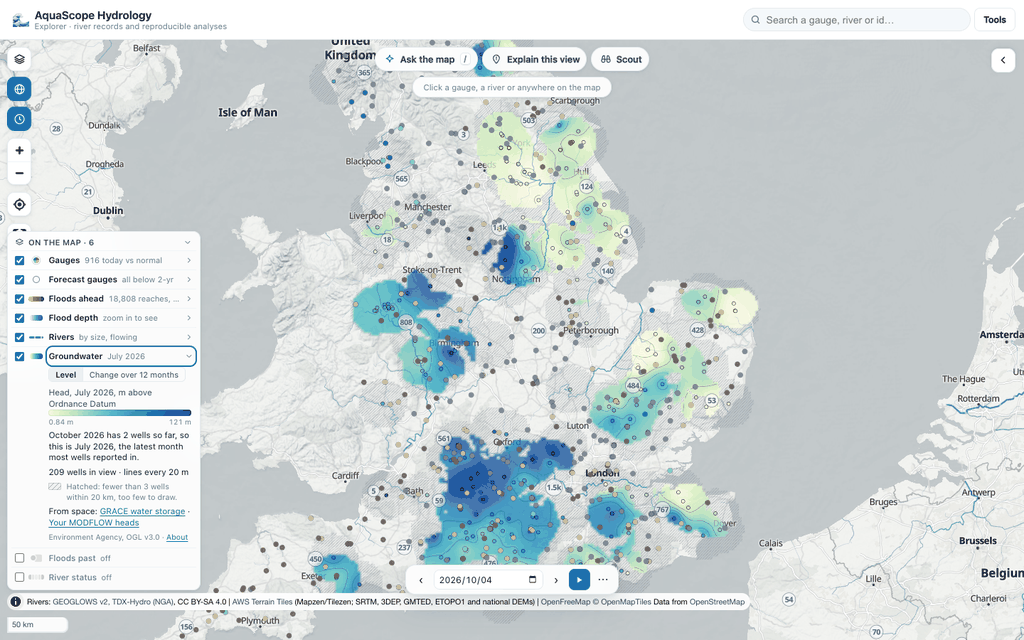
- Level or change. Level is the head in metres above Ordnance Datum: the wells' datum is common, so this is a head surface, not a depth to water (that would need each well's ground level), with contour lines. Change over 12 months is this month minus the same month a year before, at the wells that have both, brown where the level fell and blue-green where it rose; the colours saturate at a round number near the 90th percentile of the changes, so the ordinary rises and falls show.
- The month. The time bar picks it. Each well's value is the mean of its readings in the month, or the reading nearest the 15th within a month. When few wells have reported yet (the Archive is a few weeks behind), the latest month most wells reported in is drawn, and the key says so.
- The density mask. Inverse distance weighting between the wells (power 2, fading to nothing at 40 km), drawn only where at least 3 wells lie within 20 km. Where only one or two do, the map is hatched grey: looked at, too few wells to draw. Where none do, nothing is drawn. The wells are the small dots, in the same colours.
- A click on the surface opens the map card with the value there, how many wells it rests on and the nearest well; on the hatching, how many wells are near and how many the surface needs. A click on a well's gauge opens its record as usual.
- Beside it: GRACE water storage (Layers, Water storage anomaly), the regional change from space, at about 300 km, 2002 to mid-2022.
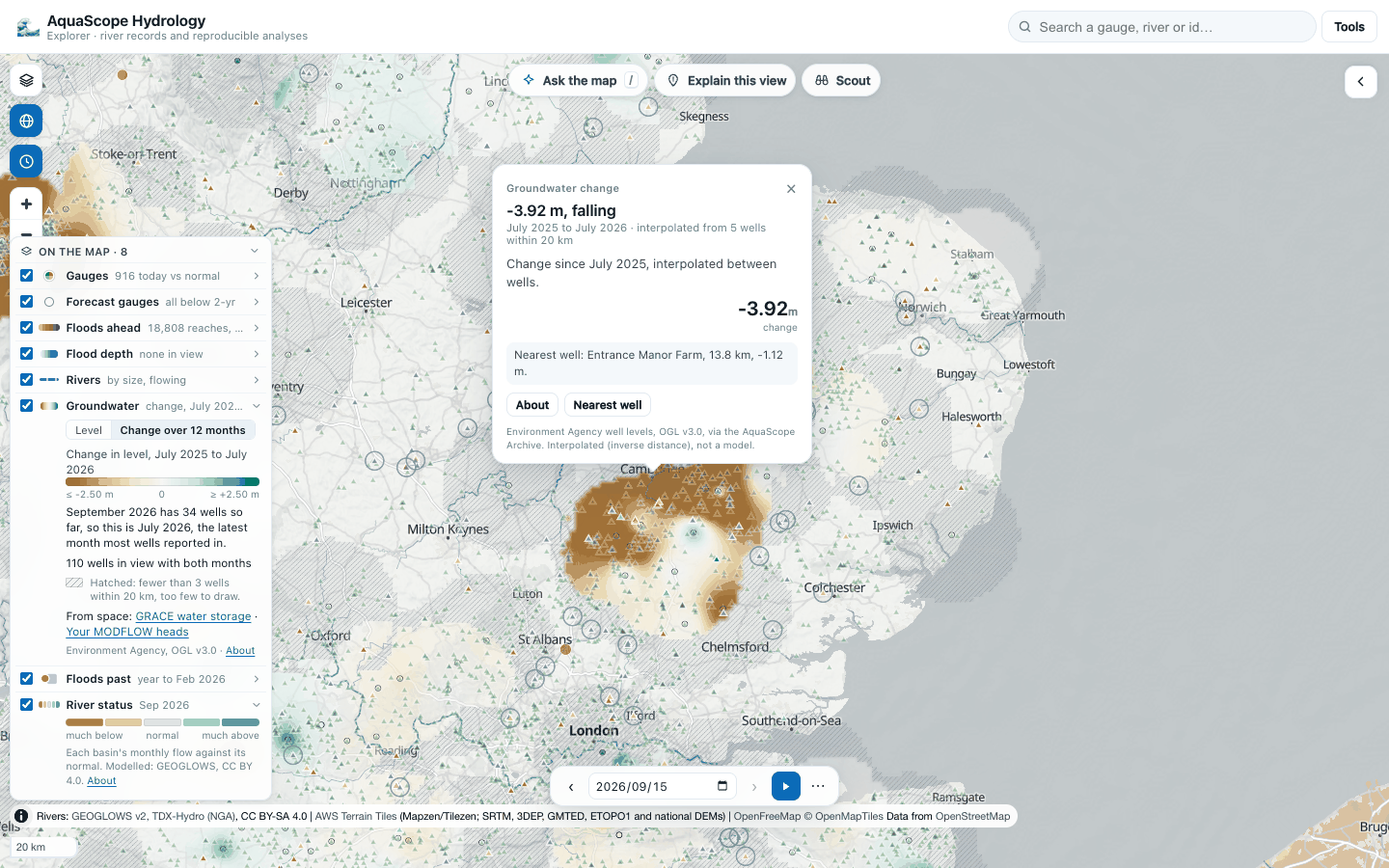
What it is not: a groundwater model. Wells in different aquifers are mixed, and between
wells the surface is a guess. How it runs: the page reads the wells' readings from the
Archive's bundle (obs/groundwater_level/uk_ea.parquet, about 4 MB, once) with DuckDB and
hands the months it needs to Python in the worker; the month, the interpolation and the
mask are aquascope.groundwater.surface.surface_from_readings.
The same in Python: aquascope groundwater surface [--bbox W S E N] [--month YYYY-MM]
[--mode level|change] [--compare YYYY-MM] [--geojson out.geojson] and the MCP tool
groundwater_surface.
Your MODFLOW heads
Drop a MODFLOW head file (.hds) on the map with its grid (.dis, .disv or
.dis.grb), and the .nam FloPy writes if it says where the model is, or open them from
the Groundwater key or Tools, Open model results (which has FloPy's Freyberg model
as a sample). The files are read in your browser's worker by aquascope's own
reader (plain numpy, checked against FloPy) and do not
leave it. When the files do not say where the model sits, nothing blocks: the first choice,
one click, puts it at the centre of the map, north up, at its true size, and labels it
"approximate placement" on the legend row and the card. The second is the exact form: the
lower-left corner, the rotation and the CRS (and a cell size without a grid file, and a
start date if you want the time bar to drive it).
The heads are drawn on the model grid, rotated with it, under the rivers: Your MODFLOW heads in the legend picks the layer, steps through the times with a slider, and plays the run with the time bar when the model has dates. The colours span the whole run, so a falling head looks like one. A click on a cell gives its row, column, layer and head.
On a structured grid the row offers three ways to look, each following the layer and the time bar (how they are computed):
- Head: a smooth head surface with labelled contours (heavier every fifth) and arrows for the direction groundwater flows, down the head gradient.
- Drawdown: the change since a reference step, brown where the water table fell, with rings around each well's cone. Measure from this step makes the step on show the reference; when the wells' heads are highest at another step, the row offers it.
- Capture: each pumping well's capture zone, shaded in its colour, with pathlines showing where its water comes from.
Wells come from a .wel file dropped with the model (the Freyberg sample brings its own),
or are found in the heads where the drawdown peaks, and the row says which. A click on a
well gives its row, column, layer, rate, drawdown and capture zone. These are streamlines
of one step in one layer, not travel times: a head file holds no conductivity or porosity.
The same in Python: aquascope modflow model.hds --grid model.dis.grb [--crs EPSG:27700]
[--origin X Y] [--layer N] [--time I] [--geojson out.geojson] [--views] [--wel model.wel] and the MCP tool
modflow_heads. More in MODFLOW heads on the map.
Beyond the plan view (#625, #626), from the same legend row:
- 3D layers stacks every layer between its top and bottom from the grid file, coloured by its head now, on the map. The vertical exaggeration is chosen so the stack stands about an eighth of the model's width and is said on the row (x1 to x500, one click each); a layer can be hidden, and Pulled apart lifts each layer off the one below to show its top. The plan view's contours, arrows and capture zones step aside while the stack stands. Plan goes back to 2D.
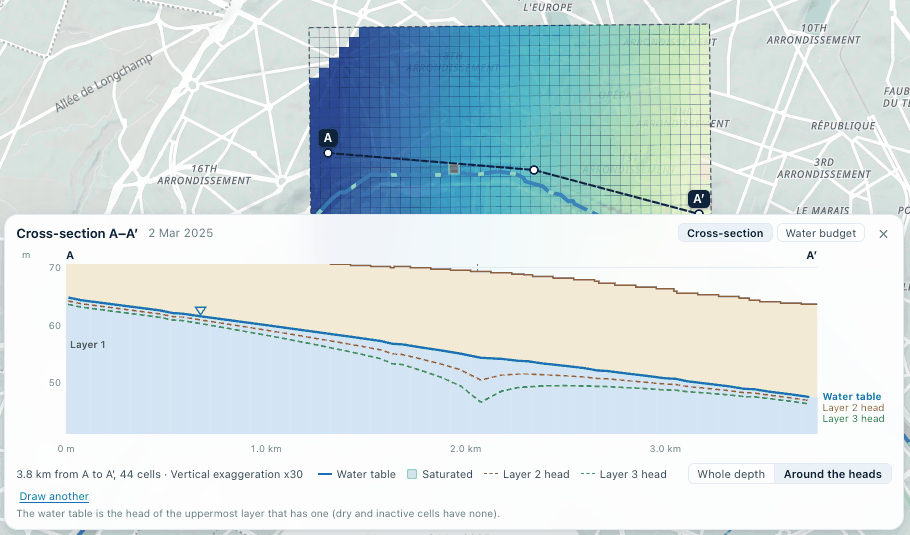
- Cross-section: click points across the model from A to A′, double-click to finish. The dock under the map shows every layer under the line (tops and bottoms as the model holds them, cell by cell), the saturated ground in blue, the water table (the head of the uppermost layer that has one) and the heads of the deeper layers, with the drawing's own vertical exaggeration. It steps with the time bar. Around the heads zooms the vertical range onto the water, where a cone of depression shows. Hover for a cell's row, column and each layer's top, bottom and head. Where the uppermost layer's head stands above its top (a confined layer), the dock says the line is a potentiometric surface, not a water table.
- A cell's card draws its head over the whole run in every layer, one line each.
- Water budget: drop the cell-by-cell budget file (
.cbc,.budor.cbb) with the other files. The dock charts each term in (above zero) and out (below) for every saved time, with the current time's table and MODFLOW's percent discrepancy beside it. A click on a column takes the map to that time.
Water balance
Water balance in the legend (off until you turn it on) colours every HydroBASINS level-4 subbasin (1,342 of them, about 100,000 km² on average) by its month, the way HEC-HMS and QSWAT basin maps show where the water goes. It follows the time bar month by month from January 1990, so play walks the months.
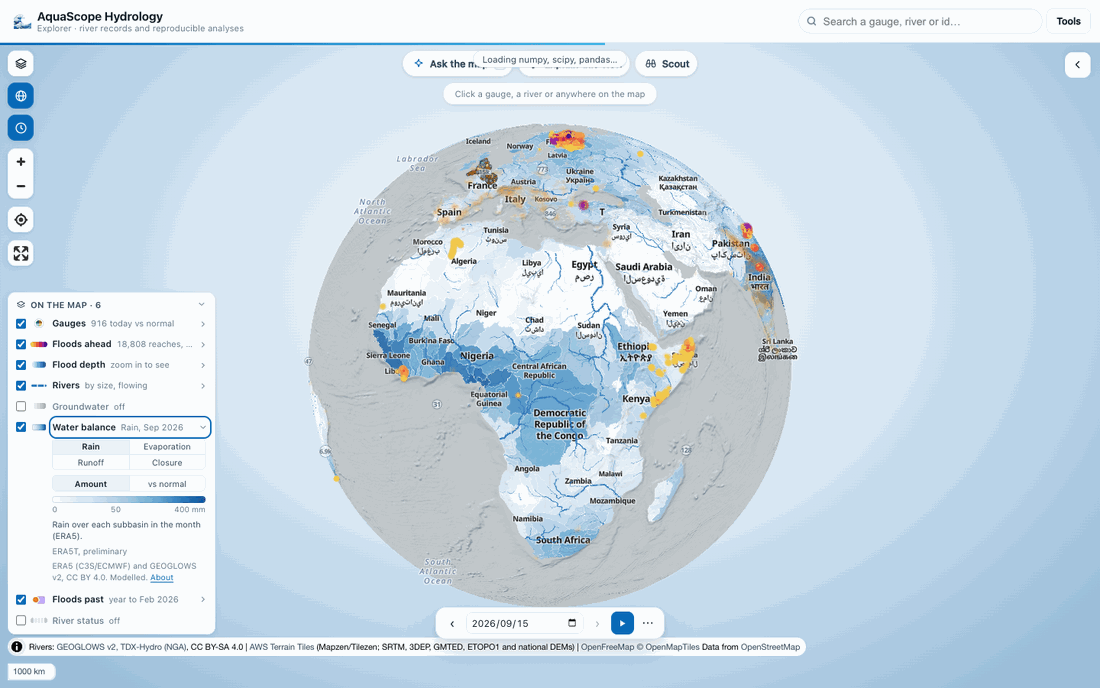
- Rain: ERA5 total precipitation, summed over the month's hours and averaged over the 0.25° cells whose centres fall in the subbasin, weighted by area.
- Evaporation: ERA5 total evaporation, which over land is the actual evapotranspiration, averaged the same way. ERA5's rather than WaPOR's: WaPOR covers Africa and the Near East since 2018, this map the world since 1990.
-
Runoff: the runoff the subbasin makes itself, the GEOGLOWS v2 monthly flow at its outlet reach minus the flow coming in from the level-4 subbasins upstream, spread over its area (BasinATLAS). Brown where the river leaves smaller than it came in. Grey where GEOGLOWS has no outlet reach for the subbasin or for one upstream of it (457 of 1,342, mostly deserts, coasts and islands), and where the difference cannot be trusted, so it is withheld (the card says which check, the flows stay in the table): the reach paired with the outlet carries less than half the inflow (a delta, a coast with several outlets), the river brings in more than a metre of water a month over the subbasin (a small subbasin on a big river, where 5 % of the inflow is already 50 mm), the outlet carries more than the rain over the record, or the inflow comes from a subbasin that fails one of these. On the nine months of 2026 that withholds 37 subbasins and leaves 848 with runoff; without it the Amazon mouth showed a loss of over 100,000 mm in a month.
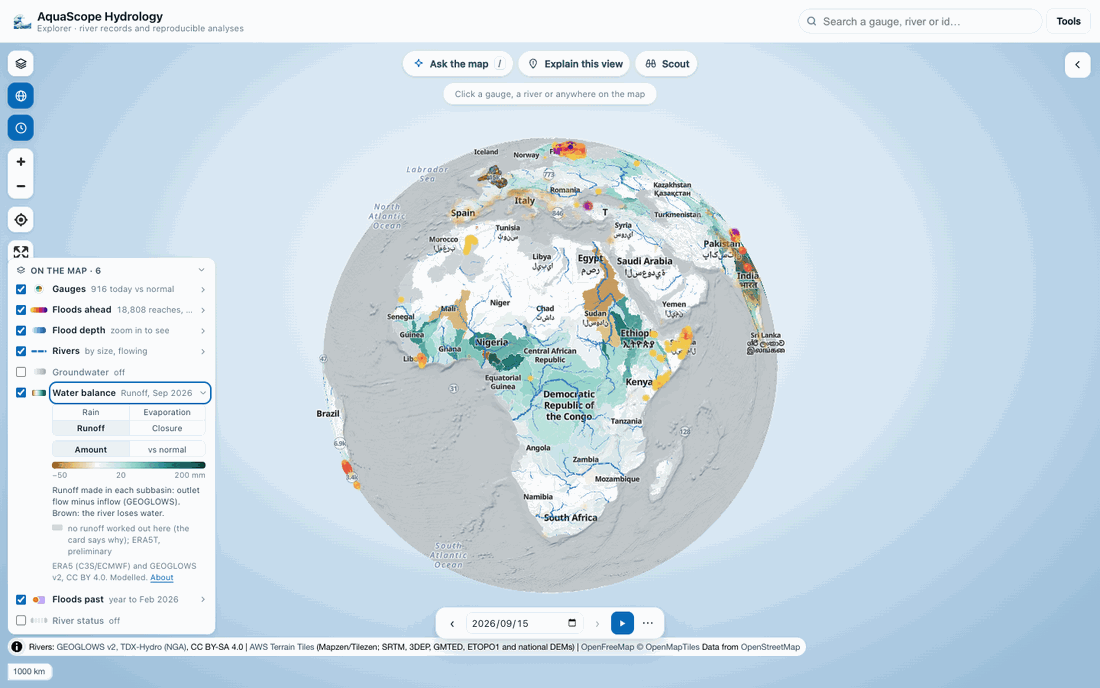
-
Closure: P − ET − Q, shown as it comes out, never hidden. It holds the change in storage (soil, snow, groundwater, lakes and reservoirs), which swings with the seasons, and the errors of three products made separately. Over whole years it should be small; where it is not, one of the three is off. GEOGLOWS is itself driven by ERA5 runoff, so the three are not independent.
- vs normal: each of the four against the subbasin's 1991-2020 mean for the calendar month (it needs at least 20 of those years; until the table holds them the key says so).
- A click on a subbasin opens the map card: the month in one sentence (every number from the file), and the year as bars, rain beside evaporation with runoff stacked on it, so the gap between the two is the closure error, with the normal rain as a tick. With a whole year it adds the year's closure. This place opens the river and gauges there.
- Turning it on turns the river status off while it is on (both colour the same level-4 basins) and back on after.
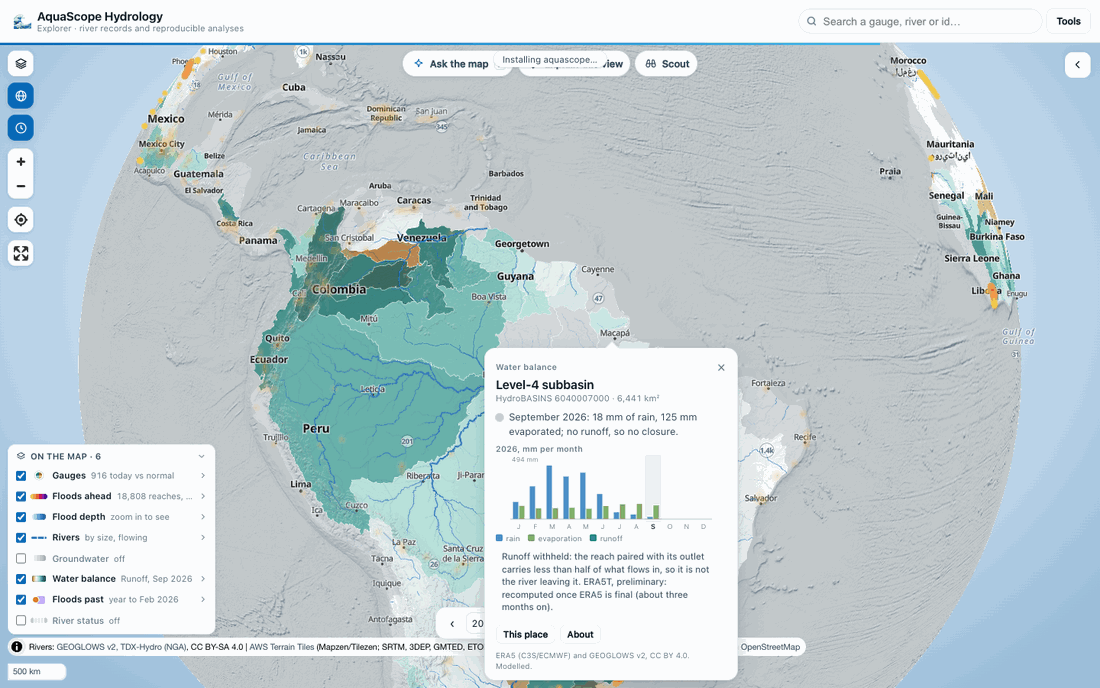
Months after ERA5's final data are ERA5T, preliminary, and are recomputed when final; the key and the card say so.
How it is made: .github/workflows/water-balance.yml runs python -m aquascope.waterbalance
run on the 9th of every month and publishes waterbalance/ in the Archive dataset (and
nothing else): monthly.parquet (one row per subbasin and month, every variable and its
anomaly, the outlet flows), normals.parquet, basins.parquet (areas, outlet reaches,
upstream and downstream neighbours), basins.geojson (simplified outlines, about 2 MB),
normals.json and one years/<YYYY>.json per year for the Explorer, and a manifest with
what the run cost. The level-4 routing comes from the Archive's BasinATLAS level-12 table:
each level-12 sub-basin is placed in its level-4 subbasin, which gives the area and which
subbasin drains into which.
What it costs, measured on 2026-10-11 before building the job. ERA5 on Google Cloud (ARCO-ERA5, read anonymously) is stored one whole-globe hour per chunk. Sampled over 1990 to 2026, a chunk is on average 1.83 MB of precipitation and 3.01 MB of evaporation, so a month is about 1,460 chunks and 3.5 GB, and January 1990 to September 2026 (441 months) about 1.56 TB. The newest, preliminary months are smaller (about 1.7 MB a chunk). Reading is the whole cost: decoding a chunk and summing it over the subbasins takes about 2 ms.
| Where | What was read | Time |
|---|---|---|
| GitHub runner (the pull request smoke, 64 threads, two runs) | 480 chunks, 0.82 GB | 11 s and 4.4 s: 74 to 186 MB/s; the whole job 1.5 to 3 min, most of it setting up |
| Home line (48 threads) | January to September 2026, 13,104 chunks, 24.3 GB | 614 s, 55 to 76 s a month |
| Home line | GEOGLOWS, the whole monthly record of the 943 outlet reaches: 568 column chunks, 0.49 GB | 125 s |
At the runners' rates the backfill is 2.3 to 5.9 hours of reading: one or two dispatches at the default 300-minute budget, since each run reads the published table first, computes only the missing months newest first until its budget, and publishes what it has. After that, a monthly run recomputes the newest three months (ERA5T becoming final), about 8 to 11 GB, a few minutes. Every run's summary reports its rate and extrapolates the backfill. The published files come to about 35 to 50 MB for the whole record (the table 14 to 25 MB, the year files about 0.5 to 0.7 MB each, the outlines 1.9 MB; the upper ends measured on a full-size table of random numbers, which compress worse than real ones). Writing that full-size table took 3 minutes and 3.3 GB of memory at most, inside a runner's 7 GB. Level 5 (about 4,700 subbasins) would read the same ERA5 chunks, so it costs the same; what it lacks is GEOGLOWS's outlet pairing, which exists for level 4 only, so this layer stays at level 4.
The same in Python: aquascope waterbalance --at LAT LON (or --basin HYBAS_ID, or a
month's overview with --month YYYY-MM [--bbox W S E N] [--variable p|et|q|closure]), and
the MCP tool water_balance.
Data: ERA5 hourly single levels, CC BY 4.0, Copernicus Climate Change Service / ECMWF (Hersbach et al. 2020; contains modified Copernicus Climate Change Service information). GEOGLOWS v2 retrospective simulation and HydroSOS tables, CC BY 4.0. HydroBASINS level-4 subbasins as published in BasinATLAS v1.0 (Linke et al. 2019), CC BY 4.0.
Context of a place
Click a point, or open a gauge, and open the Context tab: one line per layer at that place, each read when the tab is opened, with the sources and licences at the foot and one small chart (flood events per year, or the rain gauge's yearly totals). The layers are read side by side in light workers (see Speed) and each line appears as it lands.
| line | what it says | data (licence) |
|---|---|---|
| Flood history | flood events in the news within 25 km, and the months Sentinel-1 radar saw flooding, 2014 to 2024 | Google Groundsource (CC BY 4.0); Microsoft AI for Good flood dataset (MIT) |
| Surface water | how often this 30 m pixel was water from 1984 to 2024, and the change since 1984-1999 | JRC Global Surface Water v1.5 (Copernicus, free and without restriction) |
| Flood depth | modelled river flood depth at the 10 to 500-year floods | JRC CEMS-GloFAS hazard maps v2.1.2, via a Source Cooperative COG mirror (CC BY 4.0) |
| Dams | dams within 50 km, nearest first, with their storage | Global Dam Watch v1.0 (CC BY 4.0) |
| Rain gauge | the nearest GHCN-Daily station with precipitation, its span and mean yearly total | NOAA NCEI GHCN-Daily (CC0) |
| Evaporation | actual evapotranspiration and interception for the latest year, 300 m | FAO WaPOR v3 |
| Soil | topsoil texture and plant-available water in the top metre, 1 km | ISRIC SoilGrids 2.0 (CC BY 4.0) |
The same lines come from aquascope context LAT LON and the MCP tool
place_context. Rasters are read a pixel at a time with HTTP range requests by
a small pure-Python Cloud-Optimized GeoTIFF reader (aquascope.utils.cog), so
nothing needs GDAL. Flood events and dams come from the Archive's context/
mirror, built by the mirror-context workflow; until it is published those
lines say so. Global Water Watch reservoir series are not used: their licence
is not confirmed.
Catchments
For every USGS gauge, and for any point clicked in the United States, the
Explorer draws the upstream drainage basin on the map and shows its area:
the USGS Network Linked Data Index (NLDI) traces NHDPlus V2 catchments for
NWIS sites (/nwissite/USGS-<id>/basin) and, for a point, for the nearest
flowline (/hydrolocation then /comid/<id>/basin). Public domain, fetched
straight from api.water.usgs.gov (CORS), nothing stored on our side, and the
method and source are added to the citations panel.
Everywhere else on land, BasinATLAS (HydroATLAS v1.0, CC BY 4.0, from the
Archive's basins/ files) takes over: the level-12 sub-basin containing the
station or point is found in the browser (FlatGeobuf range reads), its
upstream sub-basins are walked in DuckDB-WASM and highlighted on the map
(toggle "Basins" in the legend for the outlines), and a card shows the
upstream area and BasinATLAS's own upstream-aggregated attributes: elevation,
slope, precipitation, PET, aridity, temperature, snow, natural discharge,
forest / cropland / urban / glacier / lake / karst extent, soil texture,
population density, regulation by dams, human footprint. Citation in the
methods panel.
Under the catchment card, Similar gauged basins lists the gauges whose
catchments look most like the point's or the station's (standardised
BasinATLAS attributes combined with distance, from
basins/station_catchments.parquet), the donor list one needs at an
ungauged site; click one to open it. Below it, Estimated flow regime is
what those donors suggest for the point: mean, low (Q95) and high (Q05) daily
flow and mean annual maximum in mm/d, baseflow index, seasonality and
flashiness, each transferred as a similarity-weighted mean over the ten
closest donors with a band, and the archive's published leave-one-out skill
(NSE, median error) next to every number (basins/station_signatures.parquet
and regionalization_skill.json, computed weekly by the harvest; see
archive.md).
Not a measurement, and it says so.
A click on a hillside is not a river. Every point click is first snapped to the river network (see Rivers below), and when no stream runs within 1 km the card says so, rather than quoting the upstream area of the level-12 sub-basin the point sits in: that area belongs to the river at the bottom of the slope, which used to be reported as the point's own catchment.
Why not HydroBASINS itself: the HydroSHEDS core licence forbids distributing the data "as a stand-alone product" and requires an end-user licence, so it cannot be hosted on the free-tier archive; HydroATLAS is CC BY 4.0, which is why BasinATLAS is what we mirror. MERIT-Basins is CC BY-NC.
Rivers
A click lands on a river, not just a coordinate. The point is snapped to a reach of the GEOGLOWS v2 river network (about 6.8 million reaches, TDX-Hydro geometry) within 1 km: of the reaches in reach, the main channel (the highest stream order, the nearer on a tie), since a click beside a big river is often nearer a small stream than the river's mapped centreline. The marker moves onto the river, and a line under the title says how far it moved, which reach it is, and when a smaller stream was nearer (on the Jamuna: "Snapped 959 m to the main channel (order 8); a smaller stream is 925 m away."). With no stream within 1 km it says that instead and offers the nearest mapped reach, and when a river at least two orders bigger lies a little further off (a braided river's water can be kilometres from its centreline) it offers that too. A gauge takes the nearest line, since it sits on its own river; where the reaches near it differ in size and its catchment area is known, the reach whose upstream area matches it (the evidence ladder's rule).
The River tab shows that reach's simulated daily discharge from 1940 to the latest weekly update, analysed the way a gauge is: the hydrograph with the annual maxima, the return-period table (GEV by L-moments and Log-Pearson III with 90 % intervals, downloadable as CSV), the flow-duration curve and the monthly regime with its 10th to 90th percentile band. It is a model (ERA5 runoff routed down the network), labelled modelled everywhere, and a gauge on the same river outranks it. The record comes from the GEOGLOWS REST API, under CC BY 4.0.
Trace to the sea follows the reach downstream to its outlet with the model's own routing tables, draws the path on the map, and lists the gauges within 2 km of it in the order the water reaches them, with the length and the area that drains to the starting reach. Dams within 2 km of the path show as squares on the line and in a list with their storage, main use and the km where the water meets them (Global Dam Watch v1.0, CC BY 4.0, from the Archive's mirror). One line names the countries the river crosses (Natural Earth 1:50m, public domain) and another says whether dams upstream regulate the starting reach. Until the dam mirror is published the card says so and the rest of the trace stands.
Living rivers
The river network is on from the start (#545), read in place from the 2.4 GB
streams.pmtiles in the GEOGLOWS bucket and drawn by Strahler stream order: on
the globe only the great rivers (order 8 and up, order 7 faintly), a continent's
main tributaries as you come closer, every stream from about zoom 8. It sits
above the raster overlays and below the gauges, in a calm blue that changes
shade with the basemap. Rivers (GEOGLOWS) in the rail turns it off, and a
link can carry rivers=0.
Flow direction (animated) moves a light glint along each line the way the water goes (TDX-Hydro draws every reach from its downstream end): you see the water move without a dark dash marching over every river. It steps 16 times a second, stops while the tab is hidden, holds still while the map settles (a basemap change, a frame of the time bar's play or of a GIF), and starts off when the system asks for reduced motion; the rail turns it either way. On a device that cannot draw that fast (a browser drawing WebGL without the graphics card, or steps arriving far later than asked) it steps twice a second and holds still 20 s after the last move, click, scroll or key, so the page is not kept busy; the Rivers row in the legend says so. The pulse of the gauges under Floods ahead follows the same pace.
A click lights the river up on the map. As soon as the point snaps, its reach is
ringed; then the reaches that drain to it turn a stronger blue and its way to
the sea turns orange, each on a casing of the basemap's own background, and the
rest of the network fades back. Blue against orange is the pair no common colour
blindness merges. A This river row on top of the legend says what the colours mean,
how many reaches drain there and how much area, and how many reaches it is to the
outlet; while the basin's routing tables load (a few MB, up to about 30 MB for
the largest basins) it says so. A big basin has hundreds of thousands of
reaches, so the 20,000 that drain the most are lit (the trunk and the big
tributaries) and the key says where that cut fell. The ids come from
aquascope.rivers.upstream_ids and downstream_ids, drawn with MapLibre
feature-state on riverId. The network geometry is CC BY-SA 4.0: shown here,
never republished, and credited in the map's own attribution line.
Flow vs normal on the rivers
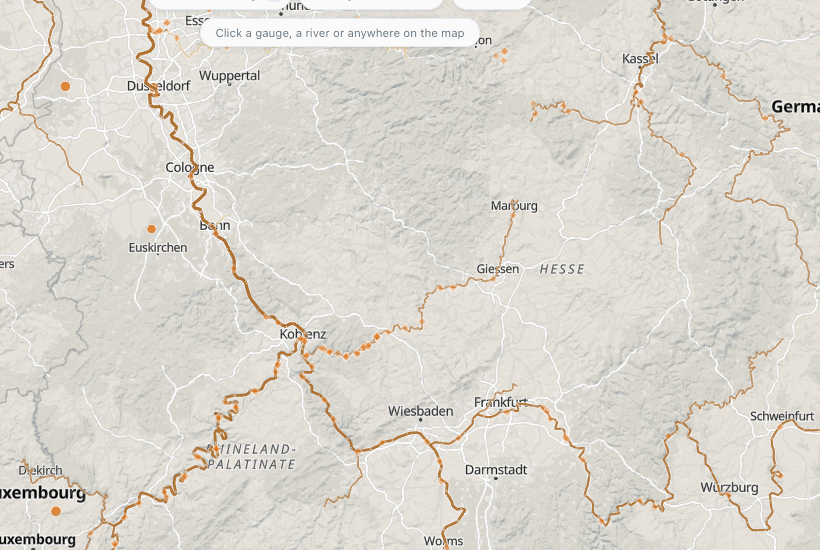
The NOAA National Water Model map colours every reach by its flow against normal; this does it for the world (#559). In the legend, the Rivers row has Colour by flow against normal: every GEOGLOWS reach of Strahler order 5 and up takes the colour of its forecast flow for the day against its own normal for the month, in the river status layer's five classes and colours (much below, below, normal, above, much above), so a river and the basin around it mean the same thing. The key gives the forecast day, the month the normal is for, and the share of reaches above and below normal; lines with no class (smaller streams as you zoom in, dry channels) fade to a thin grey.
The classes are computed in Python once a day (archive.md) and published
as one compact file, flowstatus/latest.bin.gz (the river ids and a byte each). The page reads it once and, as the
stream tiles load, sets each reach's class as MapLibre feature-state on riverId, the same mechanism as the lit
network (which now takes off only its own state, so the two can be on together). A classed reach is drawn a little
wider than the plain network, on a thin casing in the basemap's background colour, and while the classes are on the
river status layer's basins fade to 30 % of their opacity: in the same five colours, a brown river would otherwise
vanish into a brown basin. It is off by default. On the globe only the great rivers are drawn, a pixel or two wide,
and the basins already answer there; the colouring is for a region (zoom 5 and closer). A link carries fn=1.
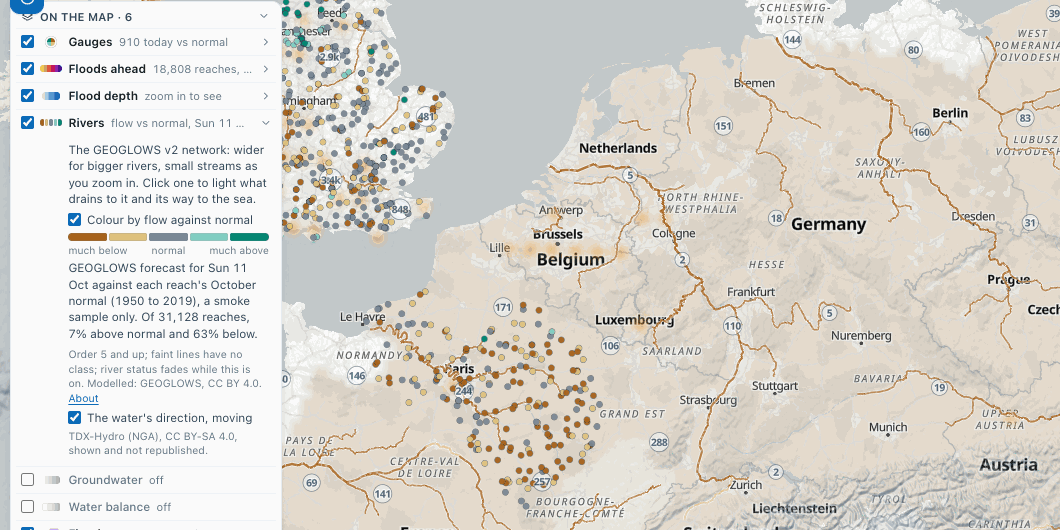
Before the first daily issue the key says it is not published yet, and the rivers and basins stay as they were. The
same issue is aquascope flowstatus [--bbox W S E N] [--river-id ID] and the MCP tool flow_vs_normal. Modelled,
not measured.
The same functions are aquascope river snap|record|area|trace|dams|upstream|downstream
and the MCP tools snap_to_river, reach_record, upstream_area,
trace_downstream, upstream_dams, upstream_ids and downstream_ids.
Evidence: the models against the gauge
On a gauge with three or more years of daily discharge, the Evidence tab sets the record beside the global models on the same river: the gauge drawn bold, GEOGLOWS v2 and GloFAS thin, on one plot. A table scores each model (KGE with r, alpha and beta, NSE, bias, and the error at the 2-, 10- and 100-year flows) and grades it A to D, and one sentence says which fits best and where they disagree. GEOGLOWS and GloFAS are computed in the page for that gauge (about half a minute); NWM v3 (US) and Google GRRR come from the table the monthly CI run publishes. The best grade also shows as a small badge next to the gauge's dates, and Best model skill in the rail's gauge colouring paints every gauge by it, with a legend. Until the first monthly run publishes the table, that colouring is grey and the legend says why. How the grades work: evidence.md.
Now and next
The Now tab on a gauge says, in one sentence, where today's flow sits against normal for the date: its percentile against the values 7 days either side of the same date in every other year of the record, and one of the five classes the USGS National Water Dashboard and WMO HydroSOS use (much below normal, below, normal, above, much above). It needs 10 years in that window and says so when there are fewer. An Archive copy is first topped up with the agency's newest days.
Under it, the next 15 days: the GEOGLOWS v2 ensemble for the gauge's river reach
(the middle half and the full range shaded, the mean as a line), GloFAS v4 through
Open-Meteo as a dotted line, the last 30 observed days and the return-period lines.
On a discharge gauge the GEOGLOWS forecast is corrected to the gauge's own record
by flow-duration quantile mapping (one curve per calendar month), and a line under
the plot gives the skill of that correction, fitted on the first 60 % of the years
the model and the gauge share and scored on the rest ("Corrected forecast: KGE 0.47
on the 1992-2026 hindcast, raw 0.21."), then the bias and the days above the
gauge's 2-year flow it caught, raw against corrected. When the reach's simulated
mean flow is more than twice or under half the gauge's, a line says the gauge may
be on another river than that reach. That is the skill of the simulation, not of
the forecast at each lead time: the daily forecast-archive workflow keeps every
forecast as issued so that skill can be measured as it builds up
(details).
On a clicked point the tab shows the reach's simulated status (against its own 86 years) and the raw forecast. The map date moves a dotted marker across the plot.
The forecast arrives in two steps: the GEOGLOWS ensemble and its sentence first, then (with a line saying what is still coming) GloFAS, the thresholds and the status, which need the reach's simulated record since 1940, and on a gauge the correction.
Speed
Python in the browser reads one URL at a time, so a worker answers one call after another. Besides the main worker, the Explorer starts up to three light workers (one on a phone) without pandas or scipy, which boot in seconds and take the calls that only read the network: the river snap of a click, the quick forecast and the Context layers, quickest first. They run side by side and beside the main worker, and a browser that cannot start them sends those calls to the main worker as before. Forecasts and Context lines already read are kept for the session.
Today vs normal, the default gauge colouring, colours the gauges from the daily status snapshot, with a legend that names the sources it covers and when it was made; gauges without a fresh record keep their agency colour. Until the first snapshot is published every gauge keeps its agency colour and the legend says so.
Both forecasts are model output under CC BY 4.0 (GEOGLOWS v2; Open-Meteo, free for
non-commercial use). The same functions are aquascope now and the MCP tools
flow_status, flow_forecast and correct_to_gauge.
Floods ahead
Floods ahead is on when the page opens: the river reaches the GEOGLOWS forecast expects to reach their 2-year flow in the next 15 days, drawn on the globe. Far out, each reach is a soft glow in its class colour (2, 5, 10, 25, 50 or 100-year flow, yellow to deep purple, darker for rarer); from about zoom 4 the river itself lights up along the GEOGLOWS stream tiles. Zoomed in past the gauge clusters (zoom 7), the Archive gauges on those reaches pulse gently (a still ring when the reader prefers less motion).
Its row in On the map says how many reaches and, opened, gives the classes, the day and the forecast run, and always says it is a model forecast, not an official warning (and, if the daily job could not read every river in time, how much it read). The map's date (the time bar) picks what is drawn: inside the forecast's 15 days each reach shows its class on that day; outside them, its 15-day peak. Play the 15 days walks the map's date through them and back. About gives the method and what it is not; the row's toggle (or the Overlays row) turns it off. On the globe the glows are small and soft, so the river status reads through them.
Clicking a reach opens the map card with its class, the peak and its day against the 2-year flow, and the ensemble plume (the FEWS view); Details opens the place's Now tab, and a button per gauge on that reach opens the gauge. Before the first daily issue is published, its legend row is one muted line that says so and nothing else changes.
The numbers come from the daily flood-warnings workflow (aquascope.archive.warnings,
details): Strahler order 5 and up plus
every reach a gauge sits on, the ensemble mean's daily peak against GEOGLOWS's own
return periods. The same issue is aquascope warnings [--bbox W S E N] and the MCP
tool flood_warnings.
Flood depth where floods are forecast
Where Floods ahead expects a reach to pass its 10-, 25-, 50- or 100-year flow, the map also shows how deep the water could get around it: the JRC CEMS-GloFAS flood depth map (v2.1.2, 3 arc-seconds, about 90 m) for the nearest return period at or below the forecast class, so 10, 20, 50 or 100 years (JRC has no 2- or 5-year maps). It is drawn in blues, light for a few centimetres to deep blue past 10 m, with a key in the map's legend that always says may flood in the next 15 days, model estimate.
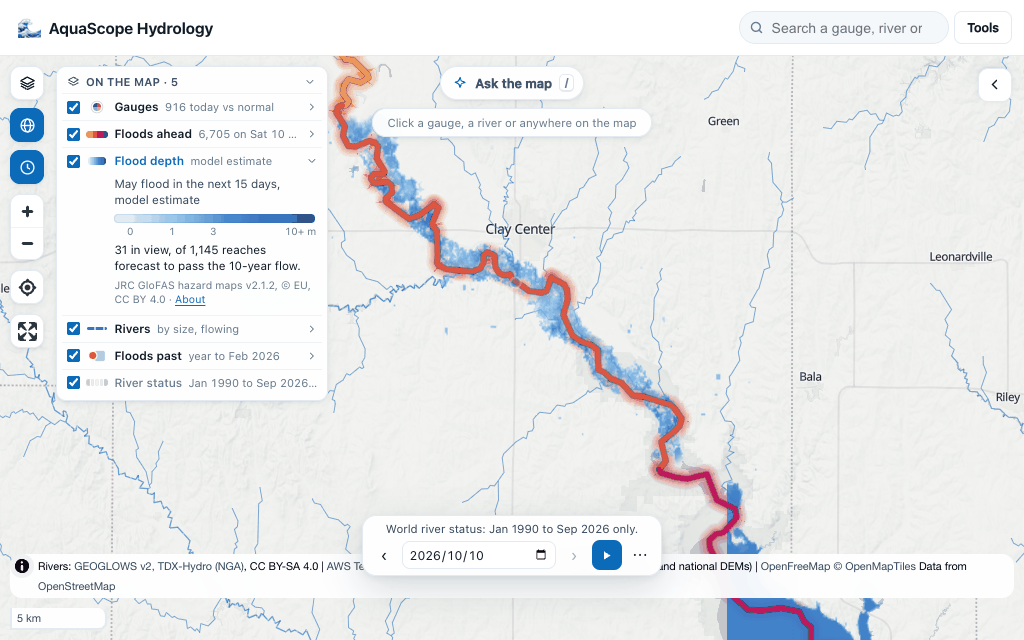
- Where. From zoom 7, around each forecast reach: within 3 km of it on a Strahler order 5 river, 1.5 km more for each order up (10 km at most), fading at the edge. Where another river at least as large is nearer, the pixel is left to it, so a tributary's forecast does not paint the main river's flood plain. Under zoom 7 the legend gives the count and Show one flies to the strongest reach of the day.
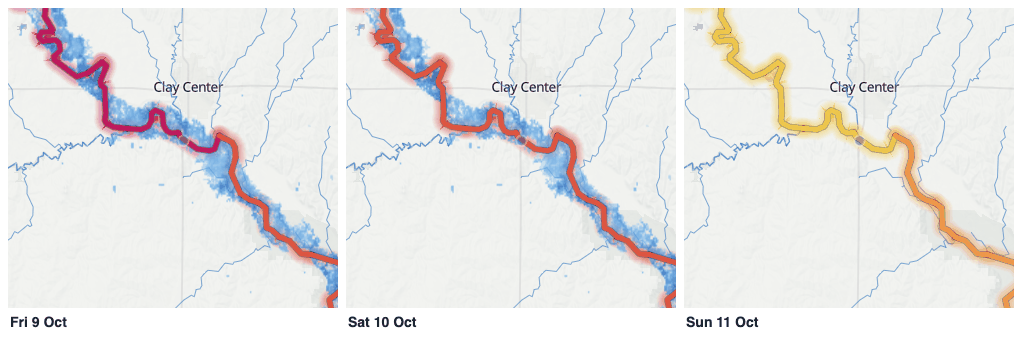
- When. The time bar picks the day, like Floods ahead: inside the 15 days each reach shows the map of its class on that day, so Play the 15 days steps the depth up and down with the forecast; outside them, the 15-day peak.
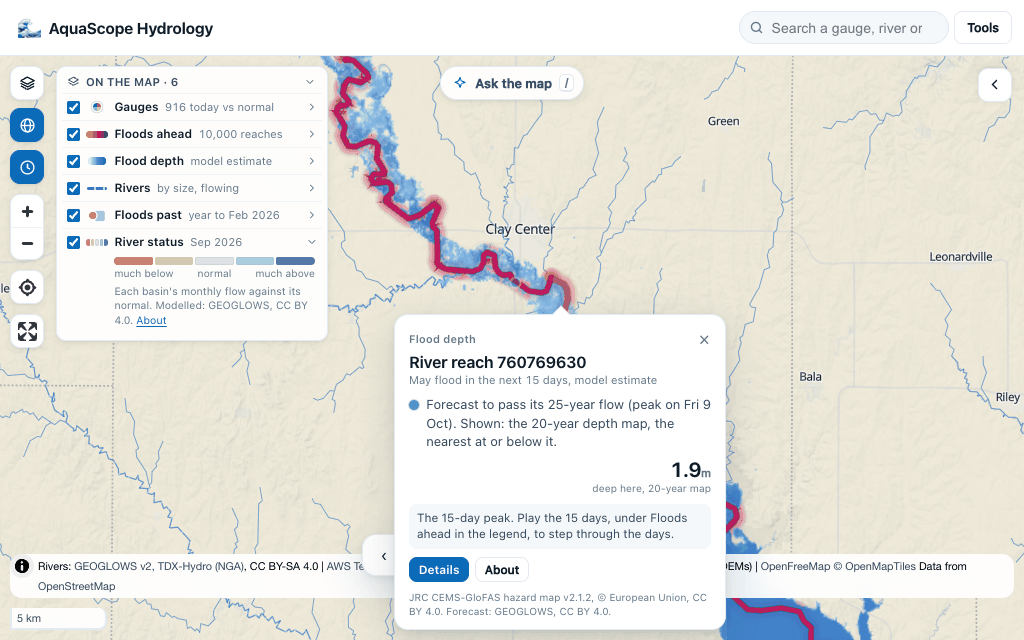
 - A click on the depth opens the map card with the reach, its forecast class and
day, the map shown and the depth at that spot. Details opens the reach's 15-day
forecast.
- A click on the depth opens the map card with the reach, its forecast class and
day, the map shown and the depth at that spot. Details opens the reach's 15-day
forecast.
How it is read: the map is cut into half-degree cells; for the cells in view (16 at most, nearest the middle first) a worker reads the depth windows with byte ranges from the Source Cooperative mirror of the JRC files (CORS open, 271 tiles of 10 degrees per return period, 17 to 180 MB each, of which a cell reads a few hundred kB), paints them with geotiff.js and keeps them, so stepping through the days repaints from memory. The cut by larger rivers uses the GEOGLOWS stream tiles the rivers layer already loaded.
What it is not: a flood simulation of this event. It is a precomputed hazard map chosen by a forecast, a model estimate twice over: the GEOGLOWS forecast and the JRC map are different models, and their return periods are not the same floods. JRC also warns that some depths are unrealistic (very deep water on small channels, at the edges between its model tiles, in sinks of the elevation model).
Licence: CC BY 4.0. JRC's own copyright notice licenses the dataset under CC BY 4.0 (credit given, changes indicated), and its README says "no restrictions, free and open Copernicus product" (both read on 2026-10-10).
The same in Python: aquascope layers depth RIVER_ID [--day YYYY-MM-DD] [--rp N] or
aquascope layers depth --bbox W S E N --rp N, and the MCP tool flood_depth_overlay:
the map chosen, the tiles with their windows and a GDAL command for each, the extent and
its clip, and the depth at the reach, the deepest pixel and the wet share around it.
Forecast points and the plume (the FEWS view)
Forecasters read Delft-FEWS and the GloFAS and EFAS viewers this way: forecast points that change colour as thresholds are passed, and one click for the ensemble hydrograph. The Explorer does the same with two kinds of point, in the Floods ahead colours.
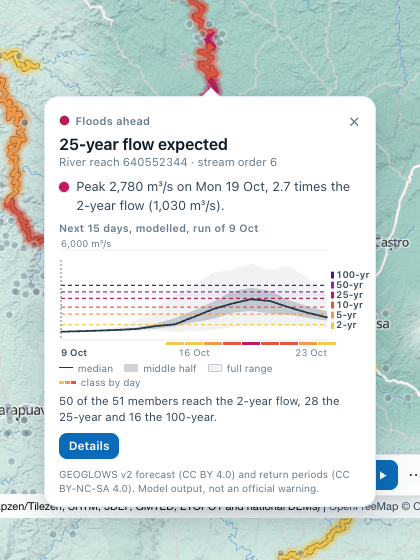
- Floods ahead reaches keep their glow and their lines. A click opens the map card with the plume for that reach.
- Forecast gauges: the Archive gauges in the daily forecast job's latest issue (about 200 a day, corrected to each gauge's record). Each is classed by its forecast against the gauge's own 2- to 100-year flows. Past the gauge clusters (zoom 7) each gets a ring: solid in the class colour when its forecast reaches the 2-year flow or more, a thin slate ring when it stays below. Further out only the gauges that reach a threshold show, as small solid marks. While their rings are in view, a Forecast gauges row in "On the map" says how many there are and how many pass the 2-year flow; its toggle hides them. Their card shows the corrected plume, with the gauge's own record before the run. A record that stops more than a week before the run is left out, and the card says the day it stops.
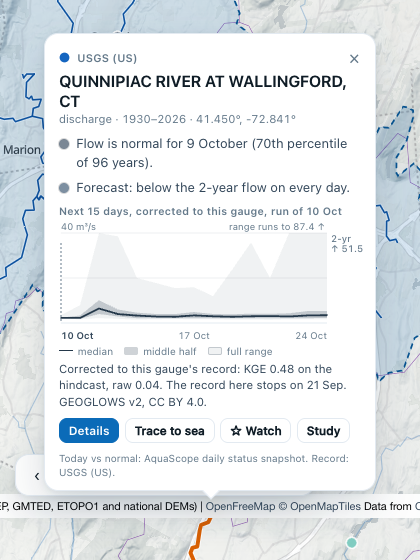
The plume shows the next 15 days from the 51 members of the GEOGLOWS ensemble (the high-resolution run left out), averaged to UTC days:
- the median (the line), the middle half (25th to 75th percentile, darker shading) and the full range (lowest to highest member, lighter shading),
- the return-period flows as dashed lines in their class colours, labelled on the right. Every line under the forecast is drawn, and the next one above when it is near. A line far above is named at the top right instead ("2-yr ↑ 51.5"),
- a strip under the days in each day's class colour (the ensemble mean against the thresholds, the Floods ahead rule),
- the gauge's record as a blue line with a dot a day, for a gauge,
- the run's first day in bold under a dotted line, and the map's date as a pale band when it falls inside.
The axis follows the bulk of the ensemble. When one wet member runs far above the rest, the full range is cut at the top and its real top is named ("range runs to 146 ↑"). Under the chart, one line says how many members reach the 2-year flow, the reach's class and the highest flow any member reaches (the CLI and the MCP tool list every return period). At a gauge it says how well the correction scored on the hindcast, and plainly when it scored worse than the raw model.
A reach's card reads the same run the map shows, against the layer's own thresholds, so the card and the colours agree. If that run does not answer, the newest one is used, and the card says the map's colours come from the older run. The plume fills within a few seconds: a light worker reads the members (about 70 kB) from the GEOGLOWS API.
The colours. The classes are Floods ahead's: 2, 5, 10, 25, 50 and 100-year flow,
yellow to deep purple, getting darker with the class. "Below the 2-year flow" is a
quiet slate (#7d8fa1), and on the map it is a hollow ring, so it differs by shape as
well as by colour. explorer/tests/fews-core.test.mjs checks the palette by
simulating protanopia, deuteranopia and tritanopia (Machado, Oliveira and Fernandes
2009, full severity). Neighbouring classes stay at least 10 CIE76 units apart under
each, and the slate at least 20 from every class. Lightness falls with the class for
normal vision. Under protanopia only the 25- and 50-year pair swap lightness, and they
stay far apart in hue.
The numbers come from aquascope.nownext: plume() for a reach (the members by
aquascope.rivers.forecast_ensemble, reduced day by day by ensemble_daily()) and
forecast_points() for the gauges (from forecasts/issued/<date>.parquet).
threshold_class() applies the Floods ahead rule. The same plume is
aquascope now --river-id ID --plume (or LAT LON --plume) and the MCP tool
forecast_plume. Model output, under CC BY 4.0 (the forecast) and CC BY-NC-SA 4.0
(GEOGLOWS's return periods), and not an official warning.
Your model results on the globe (the Crayfish view)
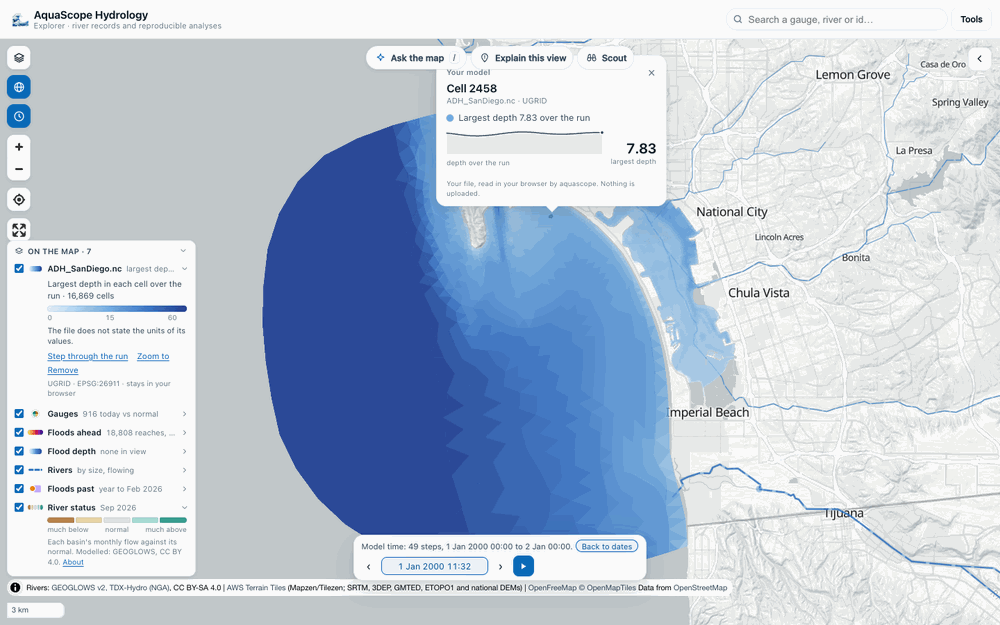
Drop a HEC-RAS 2D plan file (*.p01.hdf) or a UGRID NetCDF mesh result (*.nc: D-Flow
FM, ADH, ADCIRC and others) on the map, or use Tools, Open model results, and the
mesh is drawn on the globe, as RAS Mapper or QGIS with Crayfish would show it. Nothing is
installed and nothing is uploaded: the file is read in your browser.
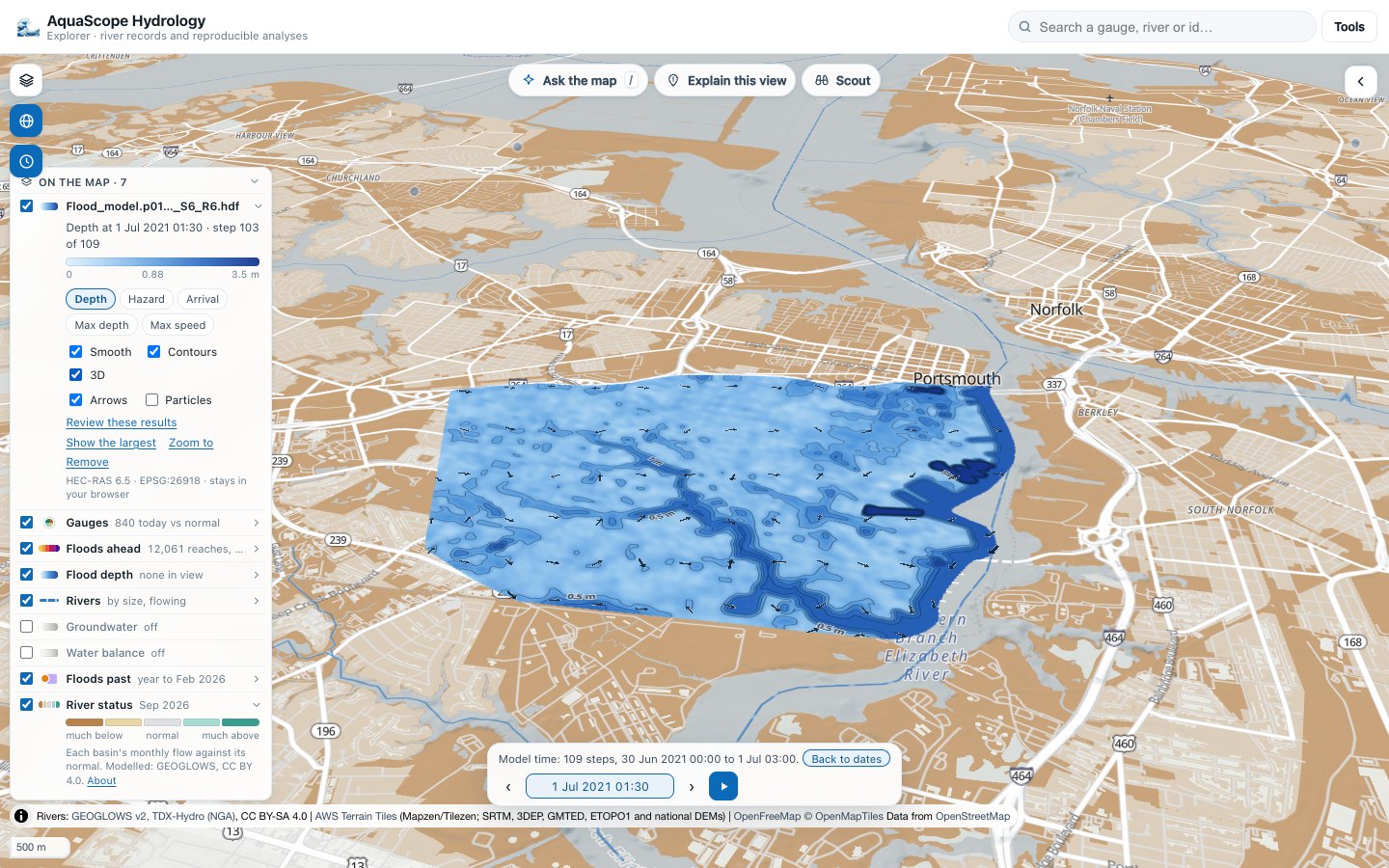
Try a sample model. Tools, Open model results also offers two samples, fetched into the page and read like a dropped file, with their credit on the legend row:
- MODFLOW: the Freyberg model, FloPy's transient example, from FloPy's GitHub repository (USGS, public domain; CC0 1.0 outside the US). Its name file places it, and its well file gives the six pumping wells for the drawdown and capture views.
- HEC-RAS 2D: compound flooding in Portsmouth, Virginia, one plan result of Zanko
Zandsalimi's GNN4CF dataset on HydroShare (CC BY 4.0), read from the Archive's copy
(
samples/hec-ras/, because HydroShare's storage does not let a web page fetch it). Until that copy is published, the button says so.
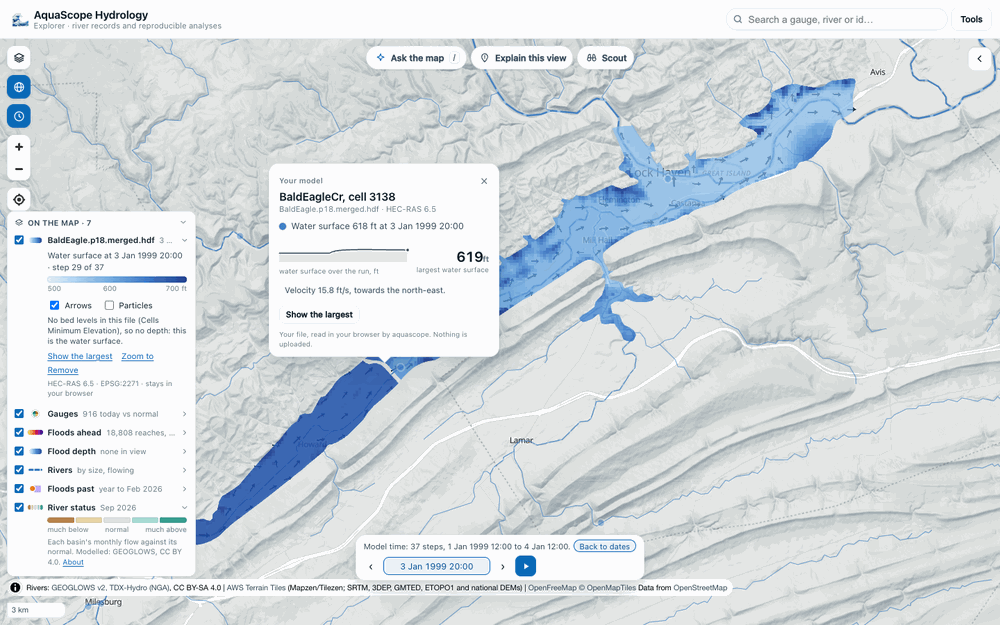
- The picture. The largest depth in each cell over the run, in blues (light and see-through when shallow, deep blue when deep), on a square-root scale up to the file's own 99th percentile. A file without bed levels shows the water surface instead, and says so. From zoom 13 the cell edges are drawn faintly.
- The arrows. One arrow for about every 46 pixels on screen, pointing where the water goes, longer when faster. In the largest view they show the step with the most water on the mesh.
- Particles. Tick Particles in the legend and white traces drift with the current (sped up so the fastest water crosses the screen in a few seconds).
- Time. The time bar switches to the model's own clock and says so ("Model time: 37 steps, 1 Jan 1999 12:00 to 4 Jan 12:00"). Step and play through the run; Back to dates returns it to the map date. Show the largest in the legend or the card goes back to the largest view.
- A click on a cell opens the map card: the depth (or water surface) and the velocity at the step on show, the largest over the run, and the time series at that cell.
- One legend row with the file's name: the ramp and its units, the arrows and particles, Zoom to and Remove.
Smooth depth, contours, 3D and lenses (#619, #620). Once the file is read, the mesh
worker builds the smooth picture and the lenses (aquascope.mesh_views, mesh.md):
- Smooth (on by default): the depth interpolated between cell centres instead of square cells, with labelled depth contours at a round interval and a line at the edge of the water. Step or play the time bar and the picture and its lines are redrawn at each step, so the flood front advances across the map. Untick Smooth to see the cells as the model computed them; Contours turns the lines off.
- 3D: the map's terrain (AWS Terrain Tiles) comes on, the camera tilts over the model and the water is draped over the relief. Untick it to put the map back as it was.
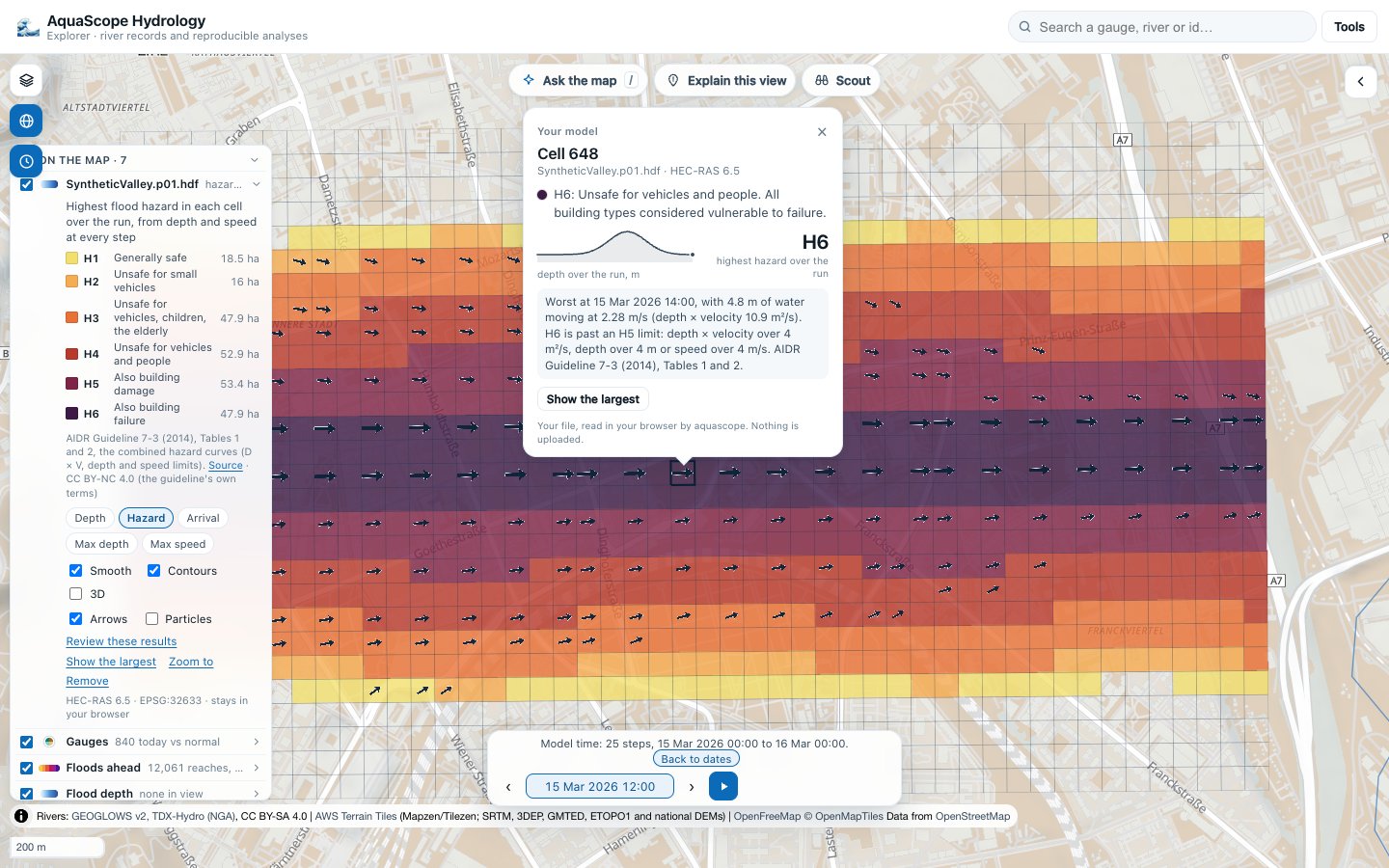
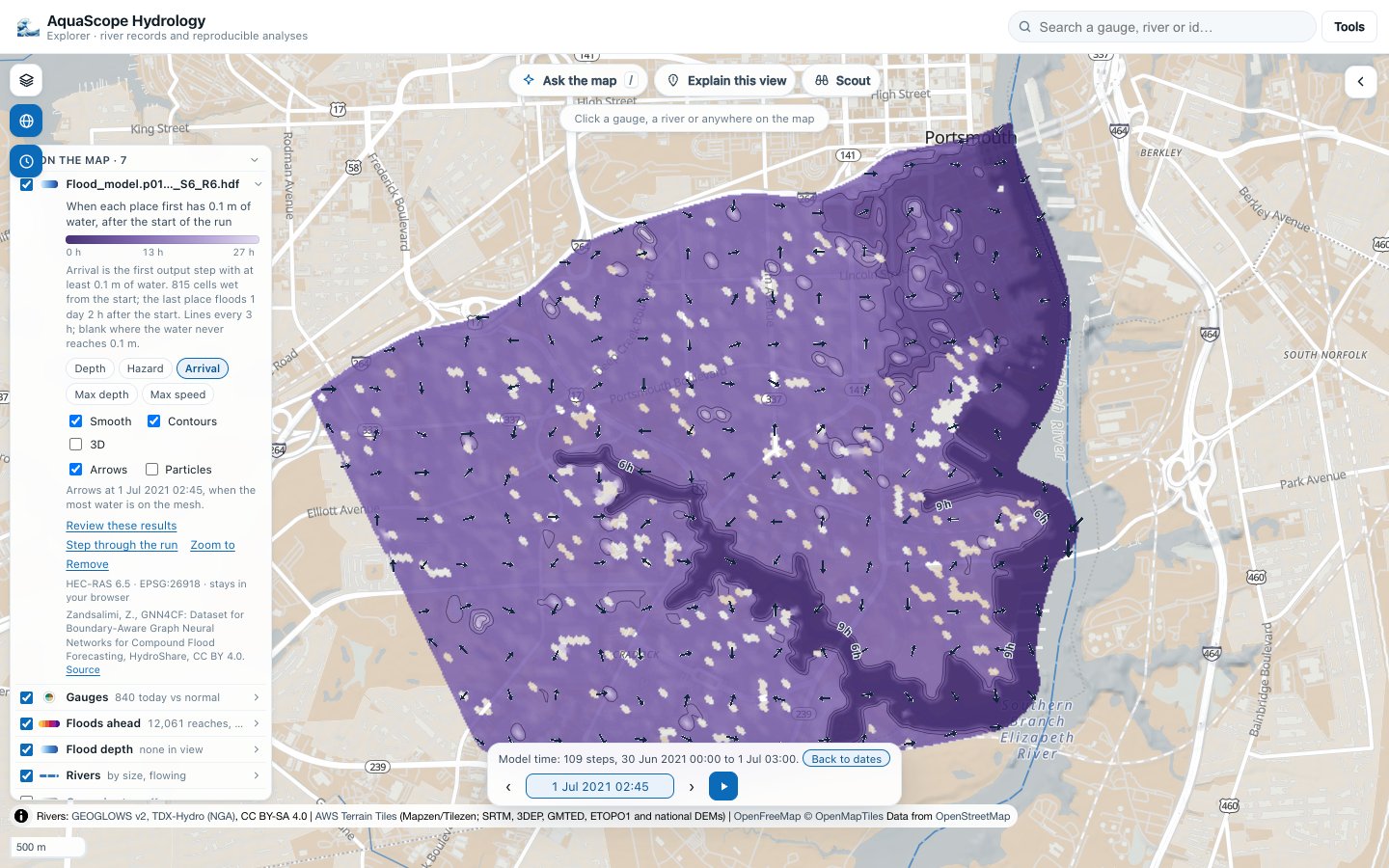
- Lenses, one at a time: Depth (the time bar's), Hazard (H1 to H6 from depth and speed at every step, the AIDR Guideline 7-3 curves, with the area in each class and the source in the key), Arrival (when each place first has 0.1 m of water, with lines of equal arrival), Max depth and Max speed. Moving the time bar goes back to Depth. A click on a cell under a lens explains the value there: the class, the step and the depth and speed that put the cell in it, and the class's limits; or when the water arrived; or the largest depth or speed and its step.
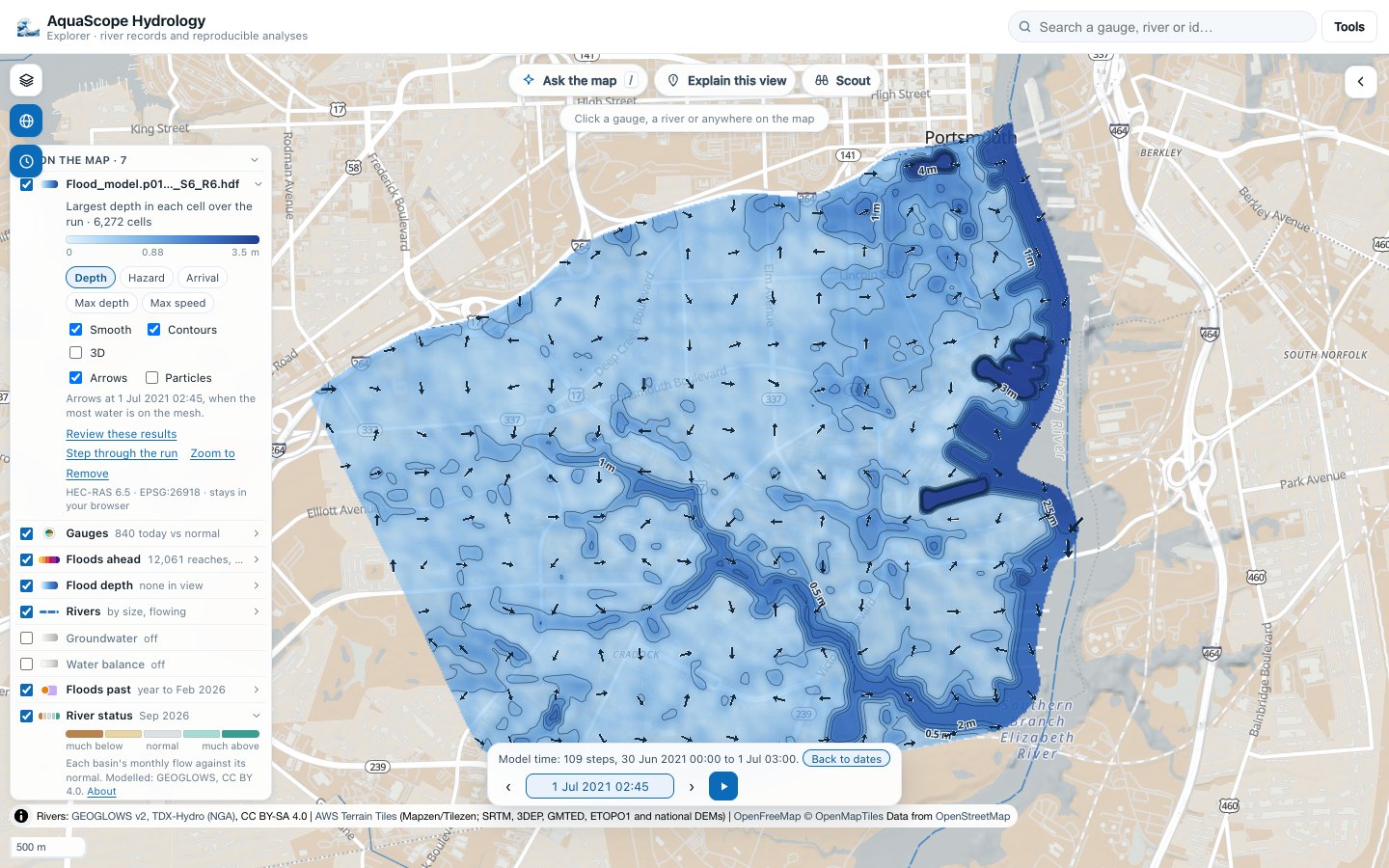
Review these results (#564) on the legend row, or "review my model" in Ask the map, runs checks by code on the run: the deepest water, negative and film depths, isolated wet cells, wet and dry flicker, the model's own volume error, the modelled extent against floods seen by radar and in the news, and the modelled peak against the Archive's gauges inside the mesh. The findings drop as numbered pins (red a problem, amber worth a look, slate for information), flag the cells they are about, and go in the action log with an undo each; the legend row lists the nine checks and what each found. A model, on the device or with your key, may only order and word them, held to the numbers by the claim lock (mesh.md).
Draw a section (#621) on the legend row: drag a line across the flood, or tap its two ends, and a panel above the time bar draws the ground and the water from A to A′, stepping with the time bar, the highest water of the run dashed; hover or touch it to read a point. A click on a cell puts its hydrograph in the card: the depth and the water level over the run, with the arrival, the peak and the time under water marked (as HEC-RAS Mapper defines them). What gets flooded (#622) counts the buildings, the road length and the people under the water at each step and at the peak, from Overture Maps (ODbL) and GHS-POP (CC BY 4.0) read in the browser, lights the flooded buildings and roads on the map, and says the limits of each count (mesh.md).
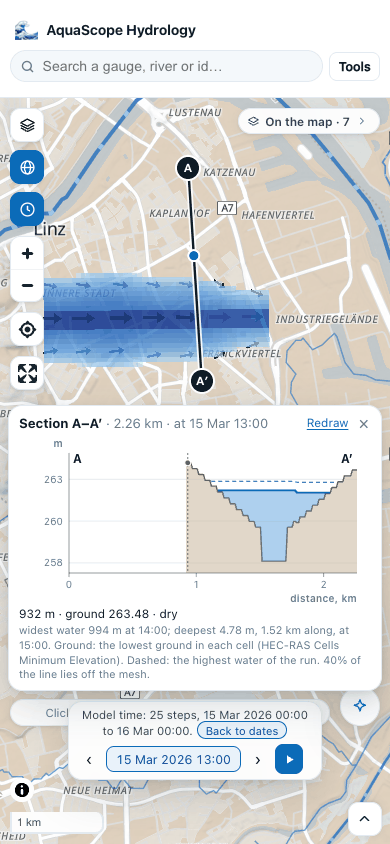
A file that does not say its coordinate system gets one question: its EPSG code (the UGRID sample above needs 26911, UTM zone 11N). A file the viewer cannot read gets one plain sentence why: not a model result, a HEC-RAS geometry file with no results in it, over 2 GB, or over 250,000 cells.
A stripped HEC-RAS plan file (*.p01.timeseries.hdf) holds the results but not the mesh
they sit on. Dropped alone, it gets one sentence naming the part that is missing and what
to drop instead: the full plan file, or the stripped file and the geometry file the plan
was run with (*.g01.hdf) together. Dropped (or picked) together, the two are read as one
run.
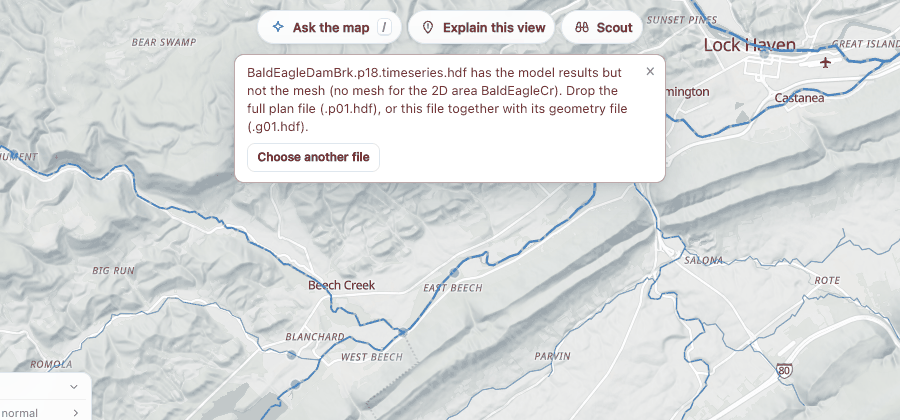
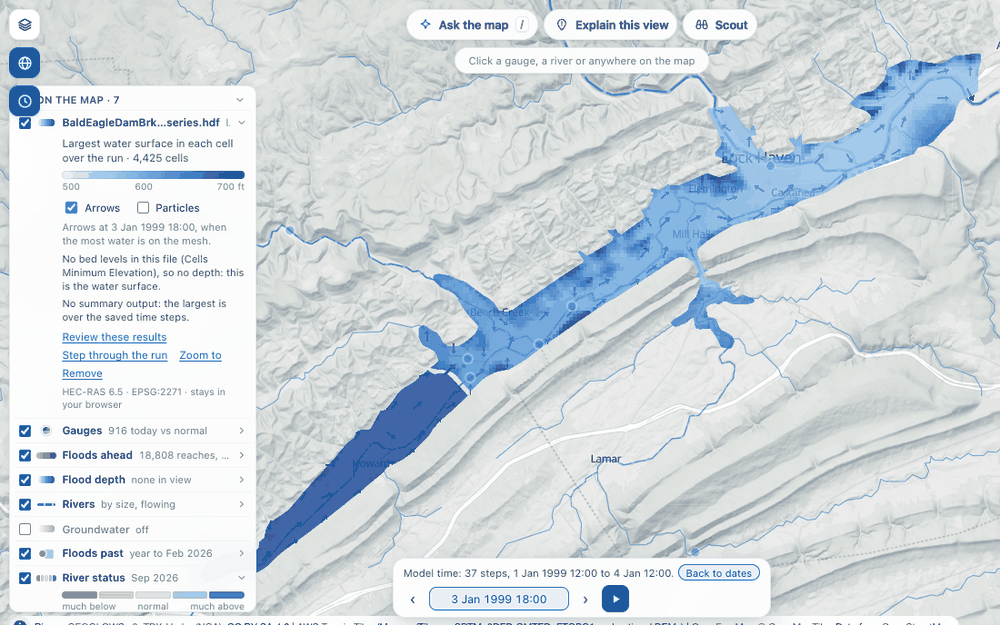
How it works. The file is handed to a worker with its own Python (Pyodide), mounted
read-only (WORKERFS) so its bytes are read from the file as needed and never copied into
memory. aquascope.io.mesh reads the cells, the maxima and the step with the most water
once, then one time step or one cell when asked (h5py for HEC-RAS and NetCDF-4, scipy for
NetCDF-3). The page works out once which cell covers each pixel of the picture, so a time
step only looks colours up: a mesh of a quarter of a million cells plays smoothly. The same
reader is aquascope mesh FILE and the MCP tool mesh_summary (mesh.md).
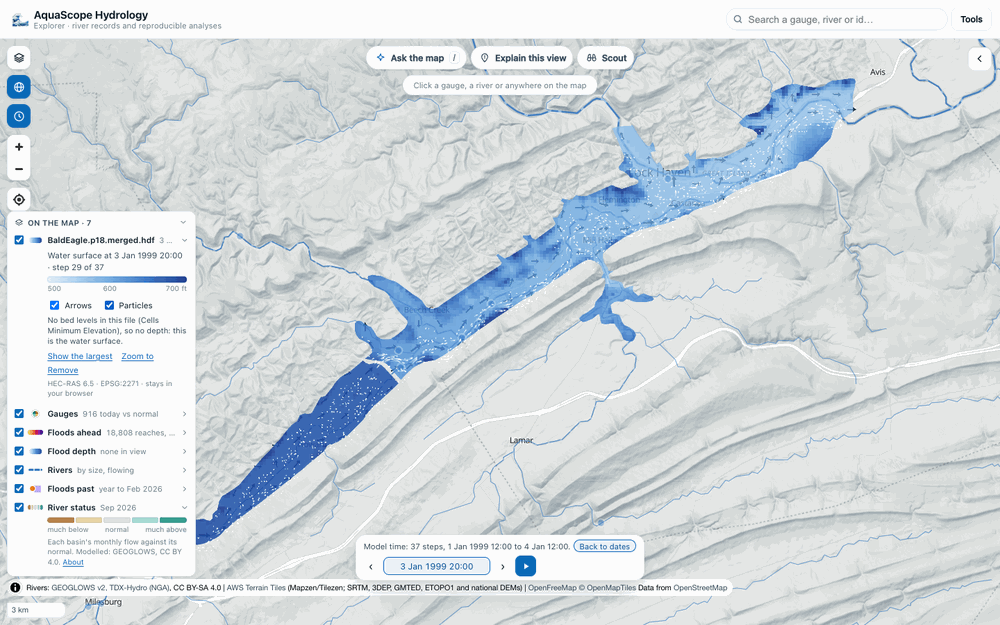
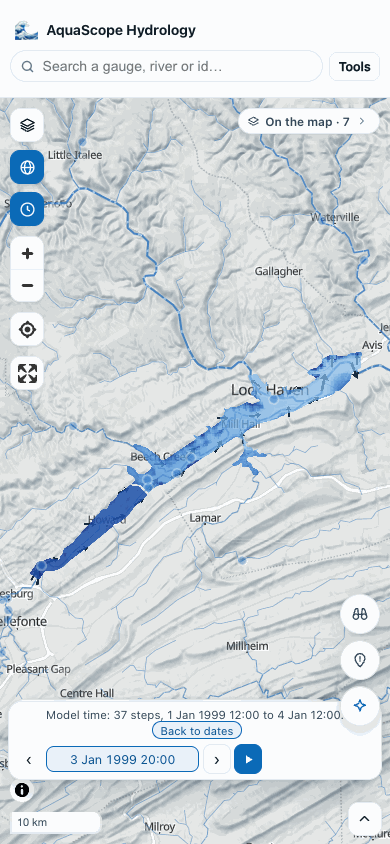
SWMM models are next. A SWMM model (.inp) and its results (.out) read in the
browser (#560): aquascope.io.swmm needs only numpy and gives the same values as SWMM's own
reader. They are not on the map yet; for now aquascope swmm model.inp model.out and the
MCP tool swmm_summary list the flooding nodes and the largest flows. What was tested and
the plan for the map view are in assessments/swmm.md.
The monthly bulletin
Bulletin in the Tools menu opens last month's state of the rivers in a reader:
the document the monthly workflow wrote (every Archive gauge's monthly mean against
the same month in its other years, by country and river basin, with the new records
and a map), with Print or save as PDF and the Markdown beside it. Last month's
status in the gauge colouring colours the gauges by their class in that bulletin;
gauges it did not class are light grey. Before the first bulletin is published, both
say so and the gauges keep their agency colours. The numbers come from
aquascope.bulletin (details); the page only shows them.
Watch: since you were here
☆ Watch on a gauge, on a clicked point's river reach and on a drawn area keeps it in a watch list in this browser (no account; the page still works when storage is blocked, it just forgets on reload). On a watched gauge one line asks where to flag the forecast: the 2-year flow by default, the 5- to 100-year flow from the gauge's own record, or a value.
The next time the Explorer opens without a link to something else, a Since you were here panel checks each watched place in turn and says, in one line each, what changed since the last visit: new days of data and the latest value, today's class against normal and the one before, the forecast peak in the next 15 days against the threshold (from the daily forecast archive, else GEOGLOWS asked there and then; modelled), and flood events in the news nearby that started since. An area says how many of its gauges are above normal today. Dismiss closes it; Watched in the Tools menu opens it again, and each name jumps to the place.
Every line comes from aquascope.watch.watch_digest in the worker, the same function
as aquascope watch ID... --since DATE and the MCP tool watch_digest. A gauge with a
live record also has Follow (Atom) in its ··· menu: a feed of its status changes
and forecast alerts, written daily (feeds).
Ask ✨: the Analyst in the page
The Ask button (top right) opens the Analyst inside the
Explorer. Type a question ("What is the 100-year flood of the Thames at
Kingston, and how sure can we be?"), pick a provider (Groq and Hugging Face
have free tiers; Anthropic, OpenAI, Mistral, OpenRouter, or any
OpenAI-compatible endpoint), paste your key, and the same aquascope.ai_engine.analyst.ask
that runs behind aquascope ask runs in the browser worker: the model picks
the tools (find_stations over the catalog already loaded in your tab,
analyze_station, flood_frequency, get_timeseries, anywhere),
aquascope executes them, and the answer ends with a Data and a Methods
and citations section assembled from the tool results. Every station the
tools touched becomes a chip that opens it on the map; the report can be
copied or downloaded as Markdown.
Your key travels from your tab straight to the provider you chose: the page
has no server, and the request is made by the browser worker (a plain
urllib client, aquascope.ai_engine.llm_transport, that also lets
aquascope ask run without the openai package). The key is kept in the tab
unless you tick "remember", which stores it in your browser's local storage.
The model has to support tool calling; the provider defaults do.
Three ways to use it, and only one needs a key
Worked examples. The drawer opens on questions that were already answered
and recorded: the question, every tool call with its arguments, the answer, and
the checks. The prose is a recording, and the panel says so. Run the tools
again re-runs the deterministic half in your own browser, live, with no key,
and shows the fresh numbers beside the recorded ones. The traces are produced by
python -m aquascope.showcase and published weekly by
.github/workflows/showcase.yml, so they track the current archive.
On your device. If your browser has Chrome's built-in Prompt API, Ask uses it directly. Otherwise you can choose to download a small open model (about 2 GB, WebLLM over WebGPU, cached by the browser after the first time). Neither is reliable at native tool calling at that size, so this tier uses a smaller loop: the model picks one tool at a time from five by replying with JSON, and after a few steps it writes the answer. It is labelled "on your device, reduced tool set" rather than presented as the full Analyst.
Your own key, as described above, for the full tool loop.
Study: a complete study at a place
The drawer's second mode. Study this place on a gauge or on a point (or
the Study button at the top right) opens it with the site set, and the
Studio crew runs in the same Pyodide worker as everything else:
you say the problem, the Consultant asks at most three questions (chips
answer them, Just go takes the defaults), the Scout lists what is in
reach, the Methodologist shows the plan as a card you Approve, Edit
(the arguments inline, revalidated) or Decline, the Analysts run it with
a gate on every step while the timeline and the figures appear, and the
Author's report lands with the key numbers, the figures, what is not
established, Download bundle and links for the Word, Excel, Markdown,
notebook and study.yaml files. The input stays open for a follow-up: a
question is answered from the workspace, a change is planned, run and
re-authored.
Keyless by default, which is a complete study; the key Ask holds is offered on one line for the prose. An on-device model that is already there (Chrome's built-in model, or the small model Ask loaded) joins the keyless crew: it reads the first sentence into a brief, writes the plan at review (the engine's validator checks it before the card shows it; the playbook's plan stands when it fails, and the card says why) and, after the run, the prose (four calls at most; the Critic's checks drop a sentence with a number the results do not carry, and the line under the answer says how many). The card says who wrote what, and nothing is ever downloaded for it.
Drop a CSV or an XLSX (turned into CSV in the worker), or attach the table
open in My data, and the Scout lists it with its QA next to the gauges.
Stop terminates the worker and boots it again; the plan is kept and the
next Approve rebuilds the study. A study is saved in the browser after every
reply (IndexedDB, the last five): opening Study at the same place offers
Resume the last study, and a workspace.json from a bundle dropped on
the board resumes too. The figures and the documents are made in the worker
and stay there until you ask for one; the plotting and document libraries
load once, before the first run, and the Study modules themselves load on
first use, never on a visit that runs no study. See
studio.md.
For an assistant already in your browser
Where the browser supports WebMCP
(navigator.modelContext), the Explorer registers find_stations,
analyze_station, anywhere, describe_catchment, show_on_map and
map_actions (Ask the map) as tools,
so an assistant in the same browser can query every gauge in the archive with
aquascope installed nowhere. It is entirely feature-detected: where the API is
absent, which is most browsers today, nothing changes. For assistants outside
the browser, aquascope mcp is the same tools over MCP, including
station_view, which returns an inline hydrograph view for clients that
support the MCP Apps extension.
What works today (Phase 0 of #189)
| source | record you get | analyses |
|---|---|---|
| USGS | daily mean discharge (or gage height), full record requested (from the catalog's first date) | all of the above |
| Environment Agency (England) | daily mean flow (falls back to level, rainfall, groundwater), full record requested | all of the above |
| Hub'Eau (France) | daily mean discharge (obs_elab QmnJ, multi-decade where computed), else last 30 days real-time |
all of the above when the daily series exists |
| PEGELONLINE (Germany) | last 31 days of W / Q | hydrograph |
| Ireland OPW | last month of 15-minute levels | hydrograph |
| Taiwan CWA | daily rainfall, last 10 years (one request per year at the source, a few seconds each) | hydrograph, annual maxima, trend |
Flood frequency needs at least 10 complete years of daily flow; the page says so when a record is shorter.
Rainfall-runoff model in the page (GR4J)
Discharge records in m3/s with a catchment area get a Rainfall-runoff model
card. "Calibrate GR4J" fetches daily precipitation and FAO-56 ET0 at the gauge
from Open-Meteo (the ERA5-Land/ERA5 blend the Caravan exporter and AquaScope Bench
use), converts the record to mm/d over the station's catchment area (agency,
else BasinATLAS), and calibrates the four GR4J parameters by differential
evolution (population 20, 40 generations, KGE on the first 65 % of the record
after a one-year warm-up) in the page: explorer/gr4j.js is a line-for-line
port of aquascope.models.rainfall_runoff.GR4J, checked against it to
round-off in the test suite, and 40 years run in about 4 ms per simulation, so
820 simulations take two seconds. You get X1 to X4, KGE / NSE / log-NSE /
PBIAS on the calibration and the validation periods, and the last six years
of observed against simulated flow. Point forcing, not catchment-averaged, so
wet mountainous catchments under-run and snow basins do badly; the numbers say
so rather than hide it. The Python model got the same treatment (the daily
loop is nine times faster, same numbers to 1e-14), which is what makes
aquascope gym usable.
How it is built
explorer/ in the repository, no build step:
index.html,style.cssand ES modules undersrc/(still no bundler):map.js,layers.jsandlayer-ui.js(MapLibre, the basemap and overlay registry),timeline.js,time-ui.js,compare-map.jsandgif.js(the map date, the time bar, swipe compare and the GIF),catalog.js(DuckDB-WASM over the archive's GeoParquet, GeoJSON fallback),search.js,shell.jsandurl.js(the map-first shell and URL-as-state), thepanel-*.jsinspectors,charts.js(Plotly),ask.jswithshowcase.jsandlocal-model.js,studio.jswithintake.js,studio-device.jsandstudy-store.js(Study, loaded on first use), andwebmcp.js.app.jswires them together.worker.js: a module Web Worker that loads Pyodide (the version pinned once, inconfig.js; Pyodide 314 runs only in module workers), numpy / scipy / pandas, and the aquascope wheel, then callsaquascope.explore; thestudiomessage drivesaquascope.studio.Studiofor Study, loading matplotlib and the document libraries only when a study runs. Its ops:start,say(with aproposedbrief),approve(with aplan),follow_up,narrate,context(a role's compact context with its system prompt),check_plan,prompts,file,exportandtable(an XLSX to CSV), each guarded on the engine having the method.aquascope.explore(in the package): the Python half, the same(source, station) -> answerentry point the CLI and the MCP server use. It runs unchanged in CPython, which is how it is tested (tests/test_explore.py).build.py: assembles the site (wheel +wheels.json+ cache-busting token)..github/workflows/explorer.ymlpublishes it to the Hugging Face static Space on every push tomain;docs.ymladds it under/explorer/app/here.
The first analysis loads about 30 MB of Python (Pyodide 314) once; the catalog itself arrives in a few seconds. Sources that don't allow browser fetches (CORS) will come through the Archive as it grows.